
Build an Announcement Banner in WordPress That Editors Can Control
Announcement banners look simple until you ship them:
- marketing wants to change copy quickly
- design wants consistent styling
- devs don’t want to redeploy for every update
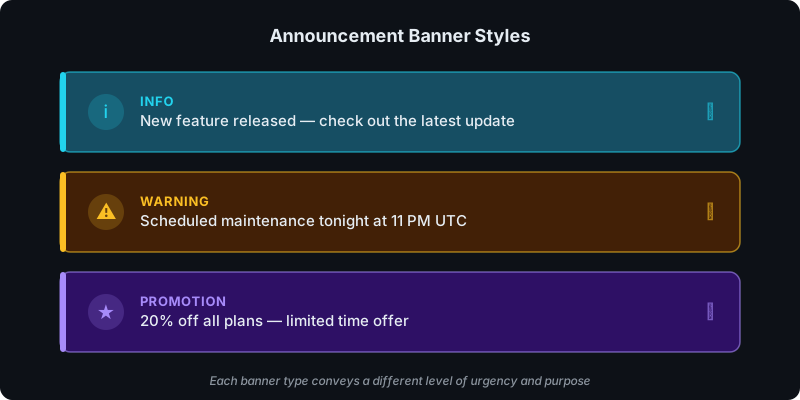
What you can build with this
- a reusable announcement banner section
- a campaign-specific promo bar
- a “maintenance notice” banner
AI prompt (copy/paste)
Paste this into your favorite UI/UX builder (Lovable, v0, Cursor, Claude):
You are a senior frontend engineer.

Build a production-ready React component for WordPress that I can upload as a ZIP to WP Render Blocks.

Component: announcement banner (editor-controlled).

Requirements:
- One TSX component with a default export.
- SSR-safe: no window/document/localStorage during render.
- Render the banner content as HTML in initial render.
- Props (TypeScript) should support:
  - message (string)
  - variant: "info" | "warning" | "promo"
  - ctaLabel?: string
  - ctaUrl?: string
  - showIcon?: boolean
- Accessibility: clear link text; avoid color-only meaning.
- Styling: Tailwind classes only; no external images; no dynamic class generation.
- No external network calls.

Deliverables:
- `AnnouncementBanner.tsx` (default export)
- minimal `package.json` (prefer zero deps)
- Example props JSON for each variant.
Direct answer: what makes a banner usable?
- easy for editors to update
- consistent styling across pages
- lightweight (no heavy JS required)
- optional CTA (single, clear action)
Step 1: Decide what the banner is allowed to say
Keep the prop surface small:
- message text
- optional link + link label
- optional “variant” (info/warning/promo)
Step 2: Make it reusable across pages
Banners are most useful when you can reuse them:
- across multiple landing pages
- across multiple sites (for agencies)
See: Build Reusable Landing Page Sections in WordPress.
Step 3: Keep it fast and readable
Avoid:
- multiple CTAs
- animated carousels inside a banner
- banner content that pushes the page down too much
Try building this with WP Render Blocks — upload your first component in under 5 minutes.
FAQ
Should the banner be dismissible?
Only if the message isn’t critical. If it’s critical (security, downtime), don’t hide it behind dismissal.
Should the banner be a block or global header?
If you need it on many pages, prefer a reusable section that can be placed consistently. If it must be everywhere, treat it as a global layout element.
For the full upload and publishing workflow, see Getting Started with WP Render Blocks.
This is part of our React + WordPress guide.
Summary
The best announcement banners are boring:
- one message
- one action
- easy to update
That’s exactly why they work.