
How to Use React Components in WordPress with Full SEO Support
If you want React UI inside WordPress and you want Google to index it reliably, the rule is simple:
Your page source must contain the content as HTML.
That's the core difference between "React embedded into WordPress" and "React that behaves like WordPress content." The rest is implementation details.
What problem are we solving?
WordPress is excellent at publishing content that search engines can crawl. React is excellent at building reusable UI components. The friction happens when you mix them:
- Many “React in WordPress” approaches ship minimal HTML and rely on JavaScript to paint content after load.
- Search engines and SEO plugins generally evaluate what’s in the initial HTML, not what appears after client-side execution.
- Agencies and freelancers often end up rewriting UI twice: once for React, once again for Gutenberg blocks.
WP Render Blocks exists to bridge that gap: upload a React component, and WordPress receives server-rendered HTML (SSR) inside a Gutenberg block, so content is present in page source.
Who is this guide for?
This guide is for you if you are:
- A WordPress developer adding React UI to marketing/content pages
- A freelancer shipping landing pages and reusable sections for multiple clients
- An agency running experiments and needing indexable output without rebuilding everything for Gutenberg
What does “full SEO support” mean (in plain terms)?
For this guide, “SEO support” means:
- Indexable HTML: the content exists in the HTML response (page source).
- Stable rendering: content doesn’t depend on client-only APIs during initial render.
- Plugin compatibility: Yoast/RankMath/etc can analyze the same HTML that users and crawlers see.
- Performance sanity: the approach doesn’t force heavy JS work just to display content.
SSR isn’t the only factor in SEO, but it’s the foundation when your content is React-driven.
What are your options for React in WordPress?
Option 1: Client-side React (CSR) embedded in a page
Typical approaches: enqueue a JS bundle, render into a div, use a shortcode, or inject an embed script.
Pros
- Easy to ship interactive UI
- Great for logged-in experiences
Cons
- For public pages, you often ship “empty” HTML and rely on JS to fill it
- Indexing can be inconsistent (and SEO plugins may not “see” the content)
Option 2: Custom Gutenberg blocks
You can build blocks in a plugin that render React in the editor and output HTML (or React) on the frontend.
Pros
- Native WordPress workflow
- Strong control over editor UX
Cons
- You’re effectively building and maintaining a WordPress product (block registration, attributes, transforms, compatibility, editor changes over time)
- Harder to reuse components across many sites without extra tooling
Option 3: Headless WordPress + Next.js (or similar)
You move rendering to a React app and use WordPress as content storage.
Pros
- Full React control + modern frontend patterns
- SSR/SSG is straightforward
Cons
- Significant architecture change (hosting, preview, editorial workflow, caching strategy, “what renders where”)
- Often overkill for sites that already work well on WordPress
Option 4: WP Render Blocks (upload React, render as HTML in WordPress)
This is the middle ground:
- Keep WordPress as WordPress (Gutenberg, plugins, themes, editors)
- Ship React components without rebuilding them as custom blocks
- Choose SSR for indexable pages; choose CSR for non-indexed pages
SSR vs CSR: what’s the actual difference in WordPress?
What is CSR?
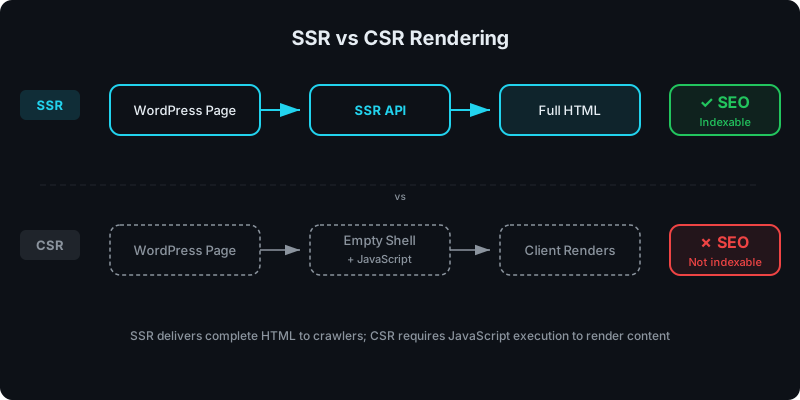
CSR (client-side rendering) means the browser runs JavaScript that generates the UI. The server typically returns an HTML shell, like:
<div id="app"></div>
<script src="/your-bundle.js"></script>
That can work fine, especially for dashboards, but it’s not ideal if the content should be immediately crawlable.
What is SSR?
SSR (server-side rendering) means your component is executed on a server, and the output HTML is returned in the response:
<section class="hero">
  <h2>Pricing</h2>
  <p>…real text in the HTML…</p>
</section>
This is what search engines and SEO plugins expect: content in page source.
If you want a deeper SSR breakdown, see: Server-Side Rendering (SSR) for WordPress: Why It Matters for SEO.
If you want the decision guide with examples, see: CSR vs SSR in WordPress: When to Use Each.
How WP Render Blocks fits (high-level)
At a high level, WP Render Blocks does this:
- You upload a React component as a ZIP
- WordPress renders it through a Gutenberg block
- The frontend receives HTML output (SSR) when you choose SSR
You can also hydrate for interactivity when appropriate.
For a step-by-step overview, see: How It Works and Documentation.
How do you implement this on a real WordPress site?
Step 1: Decide which pages need to be indexable
Create a simple rule of thumb:
- Public + should rank → SSR
- Logged-in, internal, or not indexable → CSR
This single decision prevents most “why didn’t Google index my content?” surprises later.
Step 2: Add the plugin and connect your site
You’ll install the WordPress plugin and connect your site.
For detailed setup, see the documentation.
Step 3: Upload a component and render it in Gutenberg
Once uploaded, the component appears as a block in Gutenberg. Editors configure props, publish, and the page outputs HTML.
If you want the Gutenberg-specific workflow details: How to Render React Components in WordPress Gutenberg.
Step 4: Verify output in “View Page Source”
For indexable pages, your verification method is still the simplest:
- Open the page
- “View page source”
- Confirm the meaningful text is present as HTML
If it’s not there, you’re looking at a CSR path (or a hydration-only approach).
Common pitfalls (and how to avoid them)
Pitfall: using browser-only APIs during server render
If a component reads window, document, or localStorage during render, SSR will fail or produce different output.
Fix: make the render path pure, and move browser-only work into effects or guarded checks.
Pitfall: treating SSR as “SEO solved”
SSR gives you indexable HTML, but you still need:
- good headings and semantic HTML
- internal linking
- sensible titles and descriptions
- performance basics (images, CSS, payload size)
Pitfall: linking to scheduled posts (404s)
If you reference a blog post that isn’t published yet, WP Render Blocks’ blog renderer will show it as “publishing soon” to avoid broken links.
Get SSR rendering for your React components with WP Render Blocks.
Topic guide
Every article in this series covers one aspect of using React components in WordPress. Start anywhere — they all link back here.
Getting started
- Getting Started with WP Render Blocks
- WP Render Blocks Plugin Setup Guide
- From ZIP to WordPress: Publish a React Section
- React Component ZIP Checklist
- Troubleshooting WP Render Blocks
Build tutorials
- Announcement Banner
- FAQ Section with Schema
- Feature Grid (Bento)
- Interactive Calculator
- Multi-Step Form
- Pricing Table
- Product Comparison Table
- Reusable Landing Page Sections
- Testimonials Block
AI-generated components
SSR and performance
- Core Web Vitals Guide
- Scaling SSR React Performance
- Rate Limiting SSR APIs
- Deploy on Vercel (Self-Hosted)
SEO and verification
Architecture and comparisons
- Migrate from Custom Gutenberg Blocks
- vs Custom Gutenberg Blocks
- vs Elementor / Divi
- vs Headless WordPress
- Alternatives to Custom React WordPress Builds
Enterprise and advanced
- Share Components Across Multiple Sites
- Versioning and Rollbacks
- A/B Testing React Components
- Security Model
- For Agencies
- WooCommerce Integration
FAQ
Who should use SSR in WordPress?
Use SSR for public pages where you want the content indexed: landing pages, product pages, collections, pricing, and content pages.
When is CSR the better choice?
CSR is often better for authenticated experiences (dashboards, internal tools), and for UI where SEO is irrelevant.
Do SEO plugins work with SSR components?
Yes, when the output is HTML in page source, SEO plugins analyze it like any other WordPress content.
Do I need to rebuild components as custom blocks?
Not necessarily. If your goal is “React UI in WordPress with indexable HTML,” rebuilding every component as a bespoke Gutenberg block is expensive to maintain. WP Render Blocks is designed to avoid that rebuild cycle.
Summary
If you remember one thing from this guide, it’s this:
SEO-friendly React in WordPress requires indexable HTML in page source. SSR is the practical way to get it.
From there, your job becomes choosing where SSR is necessary, integrating with Gutenberg, and keeping the workflow maintainable across sites and teams.