
How to A/B Test React Components in WordPress
Most A/B testing in WordPress relies on client-side JavaScript that swaps content after the page loads. This causes visible flicker, delays time-to-content, and can confuse crawlers when variants serve different HTML.
With SSR and component versioning, you can run A/B tests server-side -- the user receives the final variant in the initial HTML response. No flicker, no layout shift, no SEO risk.
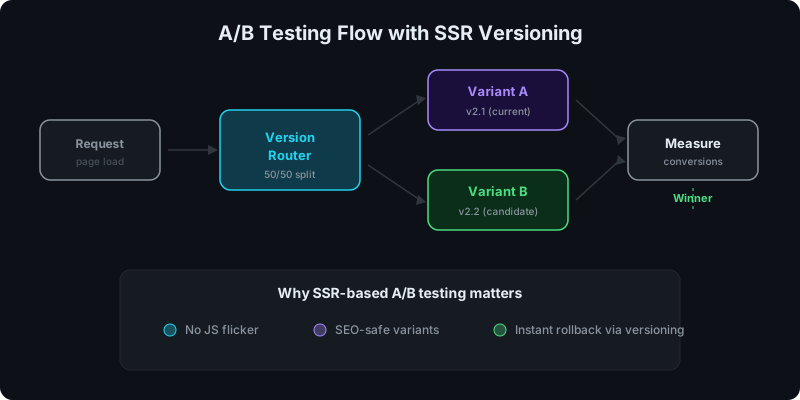
Direct answer: how does SSR enable A/B testing?
The versioning system gives you multiple immutable builds of the same component. SSR renders the selected version as HTML before the response reaches the browser.
The flow:
- User requests a page
- A routing layer selects which component version to render (50/50, 70/30, or any split)
- SSR renders that version as HTML
- The browser receives the final variant -- no swap, no flicker
- You measure conversion rates per variant
Why client-side A/B testing has problems
Traditional A/B testing tools (Google Optimize, VWO, Optimizely) inject JavaScript that:
- downloads the page with the default content
- swaps elements after load (causing flicker)
- may serve different content to crawlers vs users
- adds script weight and delays interaction
For content-heavy pages that need to rank, this creates real problems. Crawlers may index the default variant or get confused by DOM manipulation.
How versioning makes this possible
If you're already using component versioning, you have the building blocks for A/B testing:
- Version 2.1 (your current component) becomes Variant A
- Version 2.2 (your candidate) becomes Variant B
- Both are immutable builds that SSR can render independently
No code changes to the component itself. You're just routing which version gets rendered.
See: How Versioning Works for React Components in WordPress.
Setting up the routing logic
The routing decision happens before SSR rendering. Options:
Cookie-based routing
- On first visit, assign the user to a variant (set a cookie)
- On subsequent visits, serve the same variant (read the cookie)
- Pass the variant selection to the SSR layer
This ensures consistent experience per user.
Header-based routing
If you're behind a CDN or load balancer, you can split traffic at the infrastructure level:
- Cloudflare Workers, Vercel Edge Middleware, or Nginx can assign variants
- the variant ID is passed as a header to the SSR endpoint
- the SSR layer renders the corresponding component version
Simple random routing
For quick tests, a server-side random function works:
- generate a random number per request
- select variant based on the split ratio
- set a cookie so the user stays on that variant
Measuring results
A/B testing is only useful if you measure outcomes. Track:
- conversion events -- form submissions, clicks, sign-ups
- engagement metrics -- time on page, scroll depth
- bounce rate per variant
Tag each variant in your analytics (Google Analytics, Plausible, or your tracking tool of choice) so you can compare performance.
When to call a winner
Run the test until you have statistical significance. For most WordPress sites, that means:
- at least 100 conversions per variant (more is better)
- run for at least 1-2 weeks to account for traffic patterns
- don't stop the test early because one variant looks better after a day
Controlled rollouts with versioning
A/B testing and controlled rollouts share the same mechanism:
- Test: route 10% of traffic to the new version
- Validate: check for errors, performance regressions, conversion changes
- Promote: increase to 50%, then 100%
- Rollback: if the new version underperforms, switch back to the previous active version
This is safer than deploying a new version to 100% of traffic immediately. The versioning system makes rollback instant.
SEO implications
SSR-based A/B testing is more crawler-friendly than client-side testing because:
- crawlers see complete HTML (no JavaScript swap needed)
- the variant served is consistent per request
- no cloaking risk (you're not serving different content based on user agent)
If both variants have equivalent content quality, there's minimal SEO risk. Avoid testing radically different content that might confuse ranking signals.
For more on SSR and SEO: Server-Side Rendering (SSR) for WordPress: Why It Matters for SEO.
Ready to try it? Get started with WP Render Blocks.
FAQ
Can I test more than two variants?
Yes, but each additional variant requires proportionally more traffic to reach significance. For most WordPress sites, stick with two variants unless you have very high traffic.
What if the losing variant is already indexed?
Once you promote the winner and stop serving the losing variant, crawlers will pick up the winning version on the next crawl. There's no lasting SEO damage from a short-duration test.
Do I need a separate staging environment for this?
Not necessarily. You can test in production with a small traffic split (5-10%) and scale up as confidence grows. The versioning system means both variants are immutable and safe to serve.
This is part of our React + WordPress guide.
Summary
A/B testing React components in WordPress works best with SSR versioning: create two component versions, route traffic server-side, render the selected variant as HTML, and measure results. No flicker, no SEO risk, and instant rollback if the candidate underperforms.