
How Versioning Works for React Components in WordPress (Rollbacks, Pinning, and “Active”)
Versioning is what turns “a component” into something you can safely use across:
- many WordPress pages
- many WordPress sites
- many clients
- many team members
Without versioning, updates become risky: you’re changing production output with no reliable way to rollback.
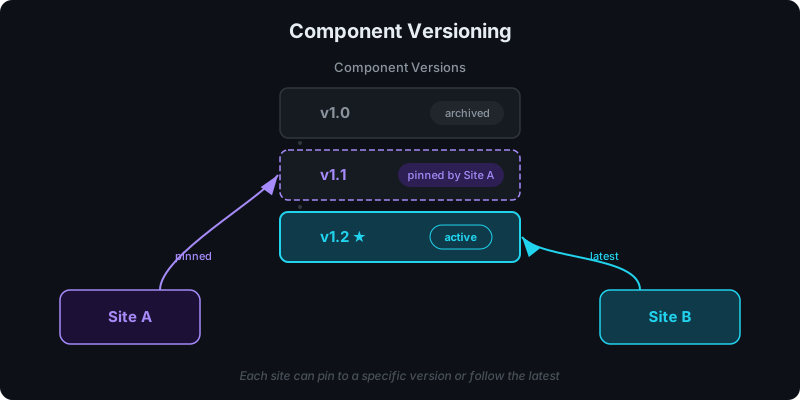
Direct answer: what versioning model should WordPress teams use?
Use a model that supports both:
- Active releases for controlled rollouts
- Pinned releases for stability
That gives you a safe default and an escape hatch.
What problem does versioning solve?
Agencies and freelancers run into the same pattern:
- A reusable React section goes into multiple pages.
- A small change is requested.
- The change accidentally breaks an older page or another client site.
Versioning solves this by making “change” explicit:
- new upload → new version
- you choose when pages/sites move to it
- you can roll back quickly
Key terms (plain language)
Version
An immutable build of your component (code + dependencies + bundling output).
Active version
The default version used when a site/page is configured to “follow active.”
Pinned version
A specific version chosen explicitly. It does not change unless you change it.
Rollback
Switching the active version back to a previous release.
When to follow “active” vs pin versions
Follow active when…
- you want centralized updates across many pages/sites
- you have a review workflow and you’re confident in releases
- you're running experiments and want fast iteration (versioning also enables A/B testing React components in WordPress without client-side flicker)
Pin versions when…
- you’re delivering a client project that must not change
- you’re running a time-sensitive campaign
- you need auditability (what was shown on a specific date)
How rollbacks should behave (and what to communicate to clients)
The safest rollback behavior is:
- Pages following active → update immediately when active changes
- Pinned pages → unchanged (explicitly stable)
That allows you to fix issues without guessing which sites will change.
Versioning and SEO: why it matters
If you’re using SSR for indexable pages, versioning affects SEO in two ways:
- content changes can impact rankings (titles, headings, internal links)
- accidental regressions can remove indexable HTML if a bad version breaks SSR
This is why the “SSR-safe” rule exists: avoid browser-only APIs during server render.
See: CSR vs SSR in WordPress: When to Use Each and Server-Side Rendering (SSR) for WordPress: Why It Matters for SEO.
A release workflow that works for agencies
Here’s a workflow that keeps clients safe and keeps you fast:
- Upload a new version
- Preview SSR output (and view page source for indexable pages)
- Set the new version as active for a staging site first (or a limited set of pages)
- Promote to active for production
- If issues occur, rollback by switching active back
If your team shares components across many sites, pair this with governance: How to Share React Components Across Multiple WordPress Sites.
Version and roll back your components — get started free.
FAQ
What does "active" mean in practice?
It means “this is the default version.” It’s the one your sites/pages will use if they follow active.
When should I avoid active releases?
Avoid following active when a page is a deliverable with strict stability requirements. Pin it.
How do I communicate versioning to non-technical editors?
Use language like:
- “This page is pinned to Version X for stability.”
- “This section follows active so improvements apply automatically.”
For the complete guide to React in WordPress, see how to use React components in WordPress with full SEO support.
Summary
Versioning is the safety layer for React components in WordPress:
- new version per upload
- active releases for controlled rollouts
- pinned versions for stability
- rollback when things go wrong
It’s the difference between “a cool component” and “a maintainable system.”