
Core Web Vitals Guide for React Components in WordPress
Google uses three Core Web Vitals to evaluate page experience: LCP (Largest Contentful Paint), CLS (Cumulative Layout Shift), and INP (Interaction to Next Paint). React components in WordPress can hurt all three if you ship them wrong.
The good news: SSR with optional hydration gives you structural advantages on every metric. For the complete guide, see React Components in WordPress with Full SEO Support.
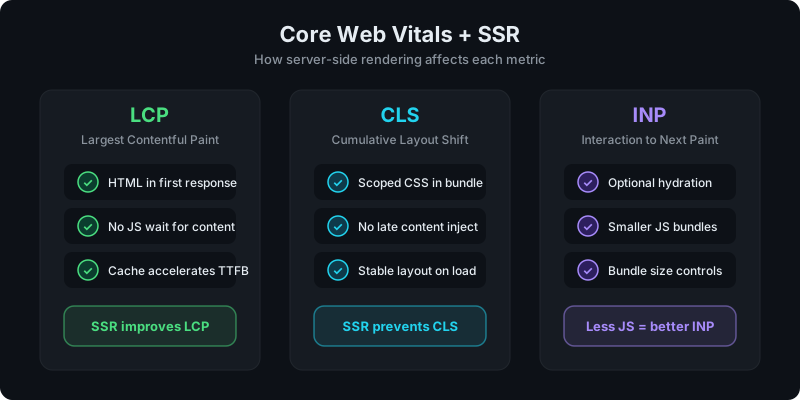
Direct answer: how do React components affect Core Web Vitals?
If a React component renders client-side only, it delays content (hurts LCP), causes layout shifts (hurts CLS), and ships unnecessary JS (hurts INP). SSR fixes the first two directly, and optional hydration controls the third.
LCP: get content into the first response
LCP measures how quickly the largest visible content element appears. CSR React components fail here because the browser must download, parse, and execute JavaScript before any content shows up.
SSR solves this by delivering HTML in the initial server response. The browser paints content immediately without waiting for JS.
Practical tips for LCP:
- Use SSR for any component that contains the page's largest content element
- Cache SSR output so TTFB stays low on repeat visits
- Avoid hydrating hero sections or large text blocks unless they need interactivity
See: Scaling React Rendering for WordPress Without Killing Performance.
CLS: prevent layout shifts with scoped CSS
CLS measures unexpected layout movement during page load. Two common causes with React in WordPress:
- Late content injection: CSR components insert content after page paint, pushing other elements around
- Unscoped CSS: component styles conflict with theme styles or load asynchronously
SSR prevents the first problem because content is already in the HTML. For CSS, keep styles scoped to the component (Tailwind utility classes or CSS modules work well) so they don't interfere with the rest of the page.
Practical tips for CLS:
- Avoid global CSS in your React components
- Set explicit dimensions on containers when content height is predictable
- Test SSR output in page source to confirm content arrives with the initial HTML
INP: control JavaScript with optional hydration
INP measures responsiveness to user interactions. Every kilobyte of JavaScript you ship adds main-thread work and potentially delays interaction responses.
The key insight: not every SSR component needs hydration. A pricing table, feature grid, or testimonial section that has no interactive behavior should render as static HTML with zero client-side JS.
Practical tips for INP:
- Hydrate only components that have event handlers, state, or effects
- Keep bundle sizes within plan limits (smaller bundles = less JS to parse)
- Split interactive logic from static content where possible
The rendering mode guide covers this in detail: CSR vs SSR in WordPress: When to Use Each.
Measuring Core Web Vitals for your components
Use these tools to verify:
- PageSpeed Insights: lab and field data for your WordPress pages
- Chrome DevTools Performance tab: identify LCP element, layout shifts, and long tasks
- View page source: confirm SSR content appears as HTML without JS execution
The pattern is consistent: if content is in page source and JS is minimal, CWV metrics tend to be healthy.
Get SSR rendering for your React components with WP Render Blocks.
FAQ
Will caching SSR output help Core Web Vitals?
Yes. Caching reduces TTFB, which directly helps LCP. It also ensures consistent, fast responses under load.
Should I avoid React entirely for performance?
No. The issue is not React itself but how it renders. SSR with optional hydration gives you React's component model without the typical CSR performance penalties.
What bundle size should I target?
Smaller is better for INP. Keep components focused and avoid shipping unused dependencies. Check your plan's bundle size limits and treat them as a performance budget, not just a quota.
Summary
Core Web Vitals and React in WordPress are compatible when you:
- use SSR to deliver content as HTML (LCP)
- scope CSS and avoid late injection (CLS)
- hydrate only interactive components and control bundle size (INP)
That combination keeps pages fast, stable, and indexable.