
Scaling React Rendering for WordPress Without Killing Performance
SSR is the foundation for SEO-friendly React components in WordPress because it puts content in page source. For a deeper look at why SSR matters for search, see Server-Side Rendering (SSR) for WordPress: Why It Matters for SEO.
But SSR can become expensive at scale if you treat every request as a fresh render and hydrate everything by default.
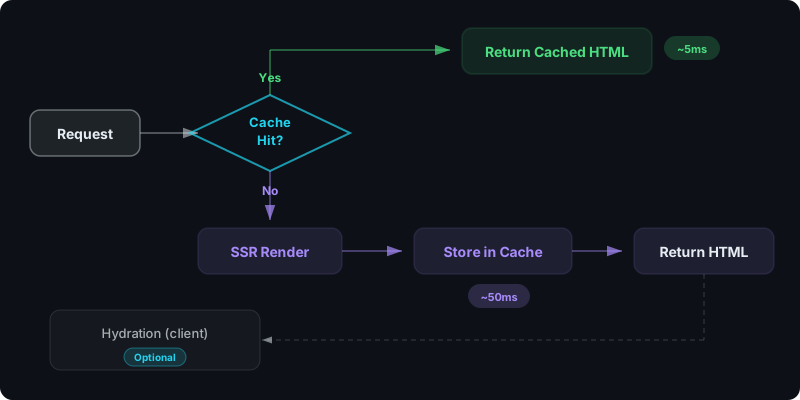
Direct answer: how do you scale SSR safely?
Use three rules:
- Cache SSR HTML outputs aggressively
- Hydrate only when interactivity is required
- Keep props payloads small and cache-friendly
What problem are we solving?
High-traffic WordPress sites have two constraints:
- pages must load fast (Core Web Vitals)
- content must be indexable (HTML in page source)
SSR helps the second, but you must engineer for the first. If you're still deciding between CSR and SSR, see CSR vs SSR in WordPress: When to Use Each.
Caching: make SSR “compute once, serve many”
The most important optimization is caching SSR output.
Cache keys generally include:
- component slug + version
- normalized props (or a stable props hash)
Even simple caching turns SSR from "per pageview compute" into "per unique variant compute." At the API level, rate limiting your SSR endpoints adds another layer of protection against expensive runaway renders.
Hydration discipline
Hydration is useful for interactivity, but it is also JavaScript cost.
Guideline:
- marketing content → SSR only, no hydration
- interactive widgets → SSR + hydrate the widget only
This reduces JS payload and keeps LCP/INP healthier.
Props payload control
Props can accidentally become “mini CMS payloads.”
That creates:
- slower renders
- worse cache hit rates
- more data to ship to the browser if hydrated
Prefer:
- small, structured props
- stable defaults
- limited variability on high-traffic pages
Rollout patterns for agencies
If you want to validate performance changes before a full rollout, consider A/B testing React components server-side using SSR versioning.
When you have many sites, performance regressions often happen during releases.
Use:
- staging first
- active vs pinned strategies
- quick rollback paths
See: How Versioning Works for React Components in WordPress.
Optimize your WordPress performance with SSR — try WP Render Blocks.
FAQ
Will SSR improve Core Web Vitals?
It can, especially when SSR makes content visible earlier. But it can also hurt if you render expensive components per request without caching. For a metric-by-metric breakdown, see our Core Web Vitals guide for React components in WordPress.
Do I need a headless architecture to scale?
Not necessarily. Many sites can scale with WordPress + SSR components if caching and payload discipline are solid.
For a complete Vercel deployment guide, see how to deploy React SSR components on Vercel.
This is part of our React + WordPress guide.
Summary
Scaling SSR in WordPress is mostly operational discipline:
- cache SSR HTML
- hydrate only what needs it
- keep props small and stable
- roll out safely with versioning
That’s how you keep SEO benefits without paying unnecessary performance costs.