
Build a Product Comparison Table in WordPress That Can Rank
"Best X for Y" pages and "X vs Y" pages are some of the most reliable traffic patterns in WordPress, when they're genuinely useful.
Comparison tables work because they:
- reduce decision time
- make criteria explicit
- attract high-intent searches
But only if search engines can actually read the content.
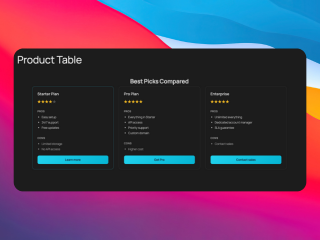
What you can build with this
- a reusable comparison-table block
- a “top 3” comparison table for affiliate/review pages
- a product-vs-product landing page with a summary + table + FAQ
AI prompt (copy/paste)
Paste this into your favorite UI/UX builder (Lovable, v0, Cursor, Claude):
You are a senior frontend engineer.

Build a production-ready React component for WordPress that I can upload as a ZIP to WP Render Blocks.

Component: SEO-friendly product comparison table (crawlable HTML).

Requirements:
- Output one TSX component with a default export.
- SSR-safe: no window/document/localStorage during render.
- Render the comparison as real HTML (use a <table> for tabular data).
- Responsive: table should be readable on mobile (stacked cards or horizontal scroll, but keep content visible as text).
- Props (TypeScript) should support:
  - heading (string)
  - intro (string)
  - criteria: string[]
  - items: Array<{
      name: string;
      badge?: string;
      summary?: string;
      values: Record<string, string>;
      ctaLabel?: string;
      ctaUrl?: string;
    }>
  - showVerdict (boolean) + verdictText (string)
- Accessibility: proper table headers, captions, and readable contrast.
- Styling: Tailwind classes only, no dynamic class generation, no external images.
- No external network calls.

Deliverables:
- `ComparisonTable.tsx` (default export)
- minimal `package.json` (prefer zero deps)
- Example props JSON with 3 items and 6 criteria.
Direct answer: what makes a comparison table SEO-friendly?
- The table content exists as HTML in page source (SSR) for indexable pages
- Criteria are consistent (users can scan and compare)
- There’s supporting copy (not just a table)
- The page includes question-based sections (why, who it’s for, alternatives)
Step 1: Start with the search intent
Pick one:
- “X vs Y” (comparison)
- “best X for Y” (shortlist)
- “X alternatives” (discovery)
Write the page to match that intent:
- “X vs Y” needs a clear verdict and tradeoffs
- “best X for Y” needs criteria and a recommendation
Step 2: Define criteria users care about (not what’s easy)
Good criteria are specific and comparable:
- price range
- setup time
- SEO implications
- editor workflow
- maintenance cost
Avoid criteria like “features” unless you define what the features mean.
Step 3: Add a short verdict before the table
A 2–4 sentence verdict increases usefulness and helps featured snippets:
- who should pick option A
- who should pick option B
- the main tradeoff
Step 4: Render as HTML for indexable pages (SSR)
If the page must rank, the table should exist as HTML in page source.
See: CSR vs SSR in WordPress: When to Use Each.
Step 5: Add the “questions people ask” section
Comparison pages win when they answer questions like:
- “Which is better for SEO?”
- “Which is faster to ship?”
- “Which is easier to maintain?”
- “What are the alternatives?”
Consider adding a short FAQ block underneath:
Common mistakes
Mistake: hiding important details behind tooltips
Tooltips are fine for UI, but your main content should be visible as text.
Mistake: changing criteria per row
If each product has different criteria, users can’t compare and search engines can’t understand structure.
Mistake: no context
Tables alone don’t build trust. Add supporting sections: who it’s for, what to choose, why.
Try building this with WP Render Blocks — upload your first component in under 5 minutes.
FAQ
Can I use a comparison table block across multiple sites?
Yes. Just keep criteria consistent and localize the copy for each site’s audience.
Should I include pricing?
If pricing is a key decision factor, yes, just avoid making the entire page about price.
This is part of our React + WordPress guide.
Summary
Comparison tables can be a durable traffic driver when they're:
- indexable as HTML
- structured with consistent criteria
- supported by clear verdict copy and FAQs