
Build an SEO-Friendly FAQ Section in WordPress (Schema + Indexable HTML)
An FAQ section is one of the simplest, highest-leverage blocks you can ship on a WordPress site, because it targets how people actually search:
- "What is X?"
- "How does X work?"
- "Is X compatible with Y?"
- "Can I do Z without A?"
To make it SEO-friendly, the rule is simple:
Your questions and answers must exist as HTML in page source.
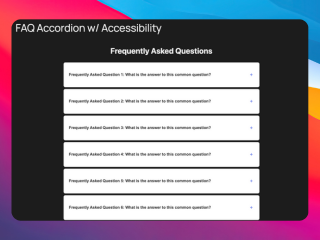
What you can build with this
- A reusable FAQ block editors can drop into any page
- A category-specific FAQ (pricing, compatibility, onboarding, features)
- A “mini knowledge base” on product pages (without writing long docs)
AI prompt (copy/paste)
Paste this into your favorite UI/UX builder (Lovable, v0, Cursor, Claude):
You are a senior frontend engineer.

Build a production-ready React component for WordPress that I can upload as a ZIP to WP Render Blocks.

Component: SEO-friendly FAQ block (questions + answers).

Requirements:
- Output one TSX component with a default export.
- SSR-safe: do NOT use window/document/localStorage during render.
- Render the full FAQ content as HTML in the initial render (no “content only after JS”).
- Provide semantic HTML: use headings for questions and paragraphs/lists for answers.
- Accessibility: keyboard-friendly toggles if you add accordion behavior, with aria-expanded/aria-controls.
- Props (TypeScript interface) should support:
  - heading (string)
  - items: Array<{ question: string; answer: string; }>
  - openFirst (boolean)
  - layout: "list" | "accordion"
  - schemaJsonLd (boolean) that, when true, renders a FAQPage JSON-LD <script> matching visible Q&A
- Styling: Tailwind classes only (no dynamic class generation). Make it look good on dark and light backgrounds.
- No external images. No external network calls.

Deliverables:
- `FaqBlock.tsx` (default export)
- a minimal `package.json` (prefer zero deps)
- Example props JSON editors can paste:
  { "heading": "...", "items": [ ... ] }
Direct answer: what makes an FAQ “SEO-friendly”?
An SEO-friendly FAQ has:
- question text that matches real queries
- direct answers in the first 1–2 sentences
- semantic HTML structure (headings, lists, paragraphs)
- indexable HTML (SSR) on pages that should rank
Step 1: Choose questions that people already ask
Pick questions from:
- sales/support emails
- WordPress plugin support threads
- competitor FAQ pages
- Search Console queries (once you have data)
Good FAQ questions are specific, not generic:
- “Does X work with Rank Math?” (good)
- “Is X good?” (bad)
Step 2: Write answers for featured snippets (then expand)
Use a two-layer answer style:
- Direct answer (1–2 sentences)
- Details (3–8 sentences or bullet points)
This works well for both SEO and AI answer engines.
Step 3: Render the FAQ as real HTML (SSR) for indexable pages
If the page must rank, render the FAQ as HTML in page source.
If you’re deciding SSR vs CSR, use this rule:
- public pages that should rank → SSR
- logged-in / internal pages → CSR is fine
See: CSR vs SSR in WordPress: When to Use Each and Server-Side Rendering (SSR) for WordPress: Why It Matters for SEO.
Step 4: Add FAQ schema (optional, but helpful)
Schema helps machines understand the Q&A structure. It doesn’t replace good content.
If you add schema:
- keep it consistent with visible page content
- avoid stuffing (don’t add extra Q&As only in schema)
For schema implementation details, see the documentation.
Step 5: Verify output the right way
For SEO pages, always validate:
- Publish the page
- View page source
- Confirm the Q&A text is present as HTML
If it’s missing, you’re likely using a CSR-only path.
Common mistakes
Mistake: turning the FAQ into marketing copy
FAQs should be answers, not slogans. If it reads like a landing page, it won’t perform like an FAQ.
Mistake: making answers too long
Short answers win snippets. Long answers win trust. Use both: short first, then expand.
Mistake: hiding the answers behind heavy JS
If the content only appears after JS runs, you introduce SEO uncertainty.
Try building this with WP Render Blocks — upload your first component in under 5 minutes.
FAQ
Who should put FAQs on pages?
Anyone with search intent around objections or compatibility questions, especially agencies and WordPress product teams.
Can I reuse the same FAQ across multiple pages?
Yes, but tailor sections where possible. Reusing identical FAQs everywhere can dilute relevance.
If you want reuse across multiple sites, see: How to Share React Components Across Multiple WordPress Sites.
For an overview of the full workflow, see how to use React components in WordPress with SEO support.
Summary
You can also build SEO-friendly product comparison tables with schema markup using the same SSR approach.
An FAQ section is one of the best "traffic blocks" you can build:
- it matches long-tail queries
- it supports featured snippets
- it's easy to keep consistent across pages
Just make sure the Q&A is real HTML in page source on pages you want indexed.