
Build a Testimonials Block in WordPress That Helps Conversions (and Still Loads Fast)
Testimonials are one of the simplest ways to increase trust on WordPress landing pages, if they're credible and easy to scan.
The biggest mistake teams make is turning testimonials into a heavy carousel that ships lots of JavaScript just to rotate text.
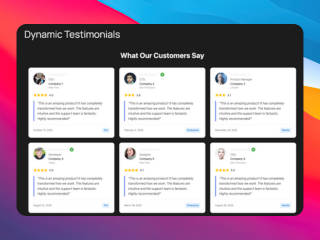
What you can build with this
- a reusable testimonial grid block
- a “trusted by” section with short quotes
- a landing page section that pairs testimonials with a use-case FAQ
AI prompt (copy/paste)
Paste this into your favorite UI/UX builder (Lovable, v0, Cursor, Claude):
You are a senior frontend engineer.

Build a production-ready React component for WordPress that I can upload as a ZIP to WP Render Blocks.

Component: testimonials/social proof grid.

Requirements:
- One TSX component with a default export.
- SSR-safe: no window/document/localStorage during render.
- Render testimonial text as HTML in the initial render (no JS required to see quotes).
- Props (TypeScript) should support:
  - heading (string)
  - testimonials: Array<{
      quote: string;
      name: string;
      role?: string;
      company?: string;
    }>
  - columns: 1 | 2 | 3
- Accessibility: proper quote markup (<blockquote>), readable typography.
- Styling: Tailwind classes only; no external images.
- No external network calls.

Deliverables:
- `TestimonialsGrid.tsx` (default export)
- minimal `package.json` (prefer zero deps)
- Example props JSON with 6 testimonials.
Direct answer: what makes a good testimonials block?
- Clear, scannable quotes (not long paragraphs)
- Trust details (name, role, company; optional photo/logo later)
- Indexable text in page source for SEO pages (SSR)
- Minimal JS by default (no slider unless you truly need it)
Step 1: Collect testimonials that match page intent
Match testimonials to the page:
- agency landing page → agency outcomes
- SEO-focused page → SEO outcomes
- speed/iteration page → shipping speed outcomes
Generic testimonials don’t convert.
Step 2: Structure testimonials for scanning
Use a consistent structure:
- 1–2 sentence quote
- name + role + company
- optional metric (“reduced build time by…”) when real
Step 3: Keep the content indexable (SSR) on public pages
If the testimonials are on a public landing page, render the quote text as HTML in page source.
See: CSR vs SSR in WordPress: When to Use Each.
Step 4: Add a small FAQ under the social proof
Testimonials reduce doubt, but FAQs remove objections.
FAQ guide: Build an SEO-Friendly FAQ Section in WordPress.
Common mistakes
Mistake: carousel-first design
Carousels hide content and often cost performance. Start with a grid.
Mistake: anonymous quotes
Anonymous testimonials are ignored. If you can’t attribute, rewrite as a case study snippet instead.
Try building this with WP Render Blocks — upload your first component in under 5 minutes.
FAQ
Should I include star ratings?
Only if they’re meaningful and consistent. Avoid fake precision.
Should testimonials be on every page?
No. Put them where trust is the main bottleneck: pricing, comparisons, and landing pages.
For an overview of the full workflow, see how to use React components in WordPress with SEO support.
Summary
A testimonials block should be:
- credible
- scannable
- fast by default
Treat it as content first, interaction second.