
How to Use V0 Components in WordPress (With SSR)
V0 by Vercel generates React components using shadcn/ui and Tailwind CSS. The output is clean, well-structured, and designed for modern React apps. But if you want that UI on a WordPress site with SEO-friendly HTML, you need a way to bridge the gap.
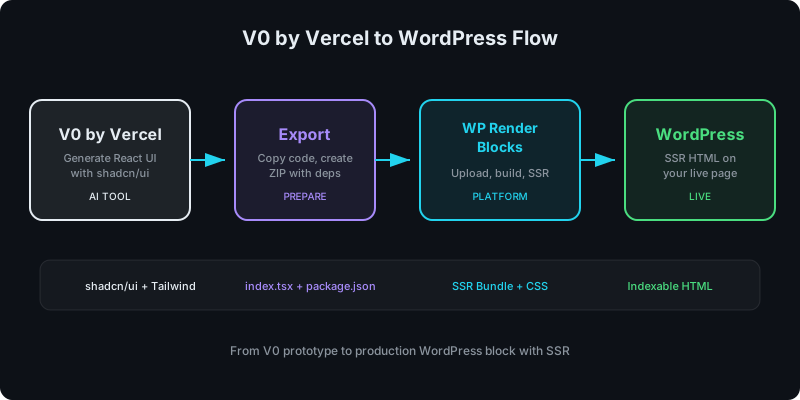
WP Render Blocks handles that: upload the V0 output as a ZIP, and it becomes a server-rendered Gutenberg block.
Direct answer
Copy the V0 component code, create a ZIP with index.tsx and package.json, upload to WP Render Blocks, and publish it as a Gutenberg block. The platform handles bundling, SSR rendering, and Gutenberg registration. Total time is under 10 minutes.
What V0 outputs
V0 generates React components with these characteristics:
- TypeScript/JSX with modern React patterns
- shadcn/ui primitives (built on Radix UI)
- Tailwind CSS for styling
- Often uses
"use client"directives (Next.js convention) - Clean component structure with props interfaces
The output is high quality, but it assumes a Next.js environment. A few adjustments make it work with WP Render Blocks.
Step-by-step workflow
1) Generate your component in V0
Use V0 to generate the component. For better SSR compatibility, add constraints to your prompt:
Build a React component for a feature comparison grid.
Requirements:
- Single TSX file with a default export
- Use Tailwind CSS for all styling
- No browser-only APIs (window, document, localStorage) during render
- Accept props for features array with name, description, and included tiers
- All content must render as HTML without JavaScript
2) Copy the component code
V0 shows the generated code in its interface. Copy the full component source. If V0 generates multiple files (sub-components), you will need all of them.
3) Prepare the ZIP
Create this structure:
my-feature-grid/
  index.tsx        # main component with default export
  package.json     # dependencies
Handle the "use client" directive: V0 often adds "use client" at the top of files. This is a Next.js directive. Remove it. WP Render Blocks manages the client/server split differently.
Handle shadcn/ui imports: V0 components often import from @/components/ui/button or similar paths. You have two options:
- Inline the shadcn/ui components: Copy the specific shadcn/ui component source files into your ZIP and update the import paths
- Use Radix primitives directly: List the underlying Radix packages in
package.json
A typical package.json for a V0 component:
{
  "name": "my-feature-grid",
  "version": "1.0.0",
  "dependencies": {
    "react": "^18.0.0",
    "@radix-ui/react-slot": "^1.0.0",
    "class-variance-authority": "^0.7.0",
    "clsx": "^2.0.0",
    "tailwind-merge": "^2.0.0",
    "lucide-react": "^0.300.0"
  }
}
Do not include node_modules/ or build artifacts. ZIP the folder.
For the full ZIP guide, see: From ZIP to WordPress: Publish a React Section That's SEO-Friendly.
4) Upload to WP Render Blocks
Log in, click New Component, upload the ZIP. The build pipeline validates, installs dependencies, and creates SSR + client bundles.
New to the platform? See: Getting Started with WP Render Blocks.
5) Add the block in Gutenberg
Open the Gutenberg editor, find your component in the block inserter, add it, configure props, and publish.
View the page source to confirm the HTML content is present for search engines.
V0-specific issues to watch for
shadcn/ui path aliases
V0 uses @/components/ui/... import paths that assume a Next.js project structure. These will fail during the build. Either inline the component files or rewrite the imports to relative paths.
The "use client" directive
Remove "use client" from the top of files. WP Render Blocks determines client vs server rendering based on your plan and configuration, not file-level directives.
cn() utility function
V0 components typically use a cn() utility that combines clsx and tailwind-merge. Include this utility in your ZIP:
import { clsx, type ClassValue } from "clsx";
import { twMerge } from "tailwind-merge";

export function cn(...inputs: ClassValue[]) {
  return twMerge(clsx(inputs));
}
Complex interactivity
V0 components with tabs, accordions, or dialogs use Radix UI primitives under the hood. These work with SSR. The initial HTML renders the default state, and hydration enables interactivity.
Dependencies and bundle size
V0 components tend to be lean, but review the dependency list. If the component pulls in a large library it only uses marginally, consider removing it.
For safety practices with AI-generated code, see: Using AI-Generated React Components in WordPress (Safely).
Upload your AI-generated components to WP Render Blocks and publish them as SSR Gutenberg blocks.
For an overview of the full workflow, see how to use React components in WordPress with SEO support.
FAQ
Can you use V0 components in WordPress?
Yes. Copy the V0 output, create a ZIP with index.tsx and package.json listing the dependencies, upload to WP Render Blocks, and publish as an SSR Gutenberg block.
Does V0 output work with SSR?
V0 components are generally SSR-compatible. The main adjustments are removing the "use client" directive and resolving shadcn/ui import paths. Interactive features hydrate on the client after the initial HTML render.
What about shadcn/ui dependencies in V0 components?
Include the specific shadcn/ui component source files directly in your ZIP and update import paths to relative references. Alternatively, list the underlying Radix UI packages in package.json.
Summary
V0 generates well-structured React components with shadcn/ui and Tailwind. WP Render Blocks turns them into SSR-rendered Gutenberg blocks. The key adjustments are: remove "use client", resolve shadcn/ui import paths, and include the cn() utility. From there, the standard workflow applies: ZIP, upload, build, publish.