
From ZIP to WordPress: Publish a React Section That’s SEO-Friendly
If you want React components to appear in WordPress as indexable HTML, the workflow matters more than the tooling.
The goal is straightforward:
- Editors use a Gutenberg block
- The frontend gets HTML in page source for pages that should rank (SSR)
- You can still add interactivity when it's actually needed
This article shows a practical "ZIP → Gutenberg → published page" workflow without over-explaining infrastructure.
Who is this for?
- WordPress developers who want predictable SEO output from React
- Agencies shipping reusable sections across multiple sites
- Teams using AI tools (Lovable/V0/Cursor/Claude) and exporting ZIPs
Direct answer: what does the pipeline produce?
From one component ZIP, you get a reusable Gutenberg block that can render your component as:
- SSR HTML (best for public/indexable pages)
- hydrated UI (best when you need interactivity)
If you want the “why SSR matters,” see: Server-Side Rendering (SSR) for WordPress: Why It Matters for SEO.
Step 1: Decide where you need SSR vs CSR
Before you upload anything, decide which pages should be indexed:
- Public pages that should rank → SSR
- Logged-in dashboards / internal tools → CSR is fine
Decision guide: CSR vs SSR in WordPress: When to Use Each.
Step 2: Package your component ZIP (the "don't break production" rules)
For a step-by-step pre-upload checklist, see the React Component ZIP Checklist.
Your ZIP typically includes:
*.tsx/*.jsxcomponent code- a minimal
package.jsondescribing dependencies - local styles (CSS modules, Tailwind output, etc.)
Your ZIP should not include:
node_modules/.next/,dist/, or other build output.envfiles or secrets
Keep it simple:
- include only what the component needs to run
- avoid large dependency trees when possible
- make sure your component is SSR-safe (no browser-only APIs during render)
If you’re using AI tools to generate components, use this checklist: Using AI-Generated React Components in WordPress (Safely).
See also: Documentation.
Step 3: Upload the ZIP and publish via Gutenberg
Once uploaded, the component becomes selectable in Gutenberg:
- add the block
- select the component
- configure props
- publish
If you want the step-by-step editor workflow: How to Render React Components in WordPress Gutenberg.
Step 4: Verify SEO output (in 30 seconds)
For an SEO page, don’t guess. Verify:
- Open the published page
- “View page source”
- Confirm the text you care about is present as HTML
If it’s not there, the page is using a CSR path and you should switch to SSR for that page.
Step 5: Iterate safely (versions + rollbacks)
Treat components like releases:
- upload a new version
- test on a staging site/page
- promote when it’s good
- roll back if needed
See: How Versioning Works for React Components in WordPress.
FAQ
Does this replace custom Gutenberg blocks?
Not always. Custom blocks are still the right tool when you need deep WordPress editor-native behavior (inner blocks, transforms, rich text tools).
But if your goal is to ship reusable React sections quickly (especially across multiple sites), a component-based workflow is often simpler to maintain.
What’s the fastest way to catch SSR issues?
Render early, then verify in “View page source.” If your component depends on browser-only APIs during render, it will fail or behave inconsistently.
Summary
You don’t need to know the internals of the build system to use it effectively.
What matters is the workflow:
- choose SSR for indexable pages
- upload a clean ZIP
- configure props in Gutenberg
- verify HTML in page source
- iterate with versions and rollbacks
For upload safety, see: Using AI-Generated React Components in WordPress (Safely).
Step 2: Dependency validation (supply-chain control)
Dependencies matter more when you render server-side.
The pipeline validates production dependencies so that:
- unknown packages can be flagged for review
- packages with server-side capabilities can be restricted
- the system can maintain a predictable execution environment
This is especially important for AI-generated code that may “just install whatever worked.”
See: Using AI-Generated React Components in WordPress (Safely).
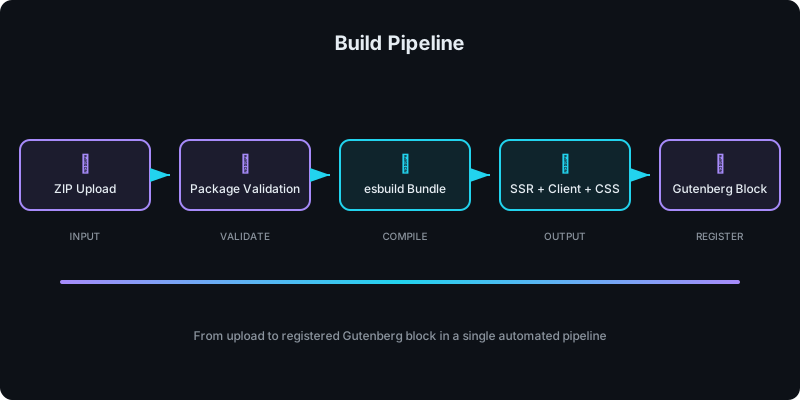
Step 3: Bundling (server + client + styles)
After validation, the pipeline bundles the component:
Server bundle (SSR)
- Runs in a Node.js environment
- Produces HTML from props
- Must be SSR-safe (no browser-only APIs during render)
Client bundle (hydration)
- Optional
- Hydrates the SSR HTML to add interactivity
- Should be kept as small as possible for performance
CSS output
- Output is served as a versioned stylesheet
- Enables style separation (and caching)
Step 4: Versioning (immutable outputs)
Every upload creates a new version.
This matters operationally:
- you can pin a specific version for stability
- you can designate an “active” version
- you can roll back if a build introduces issues
If you want the versioning model in depth: How Versioning Works for React Components in WordPress.
Step 5: WordPress requests render output (SSR)
When the Gutenberg block is rendered on a page:
- WordPress requests SSR output for the component version + props
- the service returns HTML
- the HTML is embedded in the WordPress page
For indexable pages, you can verify success via “View page source”: the content should be present as HTML.
See the practical workflow: How to Render React Components in WordPress Gutenberg.
Step 6: Caching and performance behavior
SSR doesn’t mean “slow.” The key is caching and avoiding unnecessary client work.
General principles:
- cache SSR output for repeated requests
- keep hydration optional (don’t hydrate what doesn’t need it)
- keep props payloads small on SEO pages
If you’re deciding CSR vs SSR per page: CSR vs SSR in WordPress: When to Use Each.
Security: what the pipeline is designed to prevent
Unsafe server-side execution
The biggest risk is letting untrusted code do things it shouldn’t during SSR:
- file system access
- process execution
- network egress
The pipeline mitigates this with validation and isolation strategies (and can integrate sandboxed builds).
If you want the authority deep dive, see: Why Running User-Uploaded React Code Is Dangerous (And How We Secure It) .
XSS and unsafe HTML output
SSR output must be sanitized/escaped appropriately. A common failure mode is using unsafe HTML injection in components (often AI-generated).
Ready to upload? Get started with WP Render Blocks.
FAQ
What happens when I upload a ZIP?
It's validated, dependencies are checked, bundles are produced, and the versioned assets become available for SSR and (optional) hydration.
Do I need a CLI?
No. The workflow is designed to be a web app + WordPress plugin.
Can I use this for non-indexed pages?
Yes. CSR can be appropriate for dashboards/internal pages; SSR is the default for indexable pages.
For an overview of the full workflow, see how to use React components in WordPress with SEO support.
Summary
The build pipeline is what makes "React components in WordPress with SEO" practical:
- validate inputs
- validate dependencies
- bundle SSR + client + CSS outputs
- version everything
- render HTML on demand for WordPress
That turns AI-speed UI creation into a production workflow you can govern.