
Using AI-Generated React Components in WordPress (Safely)
AI tools can generate high-quality React UI in minutes. The risk is assuming "looks correct" equals "safe to run on a server" or "safe to publish on a WordPress page."
If you plan to render components into indexable HTML (SSR), you're not just shipping UI. You're executing code in an environment that must be protected.
What problem are we solving?
For WordPress teams, AI-generated UI creates two opposing forces:
- Speed: rapid iteration on landing pages, sections, and blocks
- Risk: unknown dependencies, unsafe rendering behavior, and XSS/HTML injection patterns
The goal is to keep the speed without introducing fragile components that break SSR, ship unsafe HTML, or bloat your pages.
Who is this for?
This is for WordPress developers, freelancers, and agencies who:
- export components from Lovable, V0, Cursor, Claude (or similar)
- upload components as ZIPs (you can also use Lovable to generate and deploy components directly to WordPress)
- need SSR output for SEO pages
- want predictable behavior across multiple client sites
Direct answer: what makes an AI-generated component “safe”?
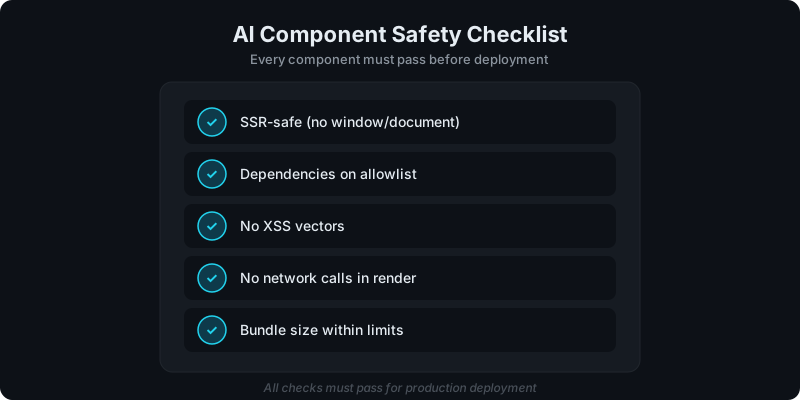
A component is “safe enough” to ship when:
- it renders without browser-only APIs during SSR
- it does not execute untrusted code or spawn processes
- its dependencies are known and reviewed
- it doesn’t output unsanitized HTML based on untrusted props
- you avoid shipping secrets/build artifacts and you keep the package small and reviewable
Safety checklist (practical)
1) SSR safety: can it render without the browser?
If you want SEO-friendly HTML in WordPress, you want SSR:
- SSR means content exists in page source
- CSR means content appears after JavaScript
See the SSR explanation: Server-Side Rendering (SSR) for WordPress: Why It Matters for SEO.
SSR-safe rules of thumb
- During render, avoid direct
window,document,localStorage,navigator - Move browser-only logic into effects or guard checks
- Prefer pure components: props in → HTML out
2) Dependency hygiene: treat package.json as an attack surface
AI-generated components often pull in packages “because it worked in a demo.”
That’s how you end up with:
- dependency bloat (performance risk)
- packages with server-side capabilities (execution/egress risk)
- packages that haven’t been maintained or audited
Practical rule: keep dependencies minimal and deliberate.
If your workflow involves uploading components, make sure you have some review step for new/unknown dependencies (even if it’s just a checklist in a PR).
3) XSS and HTML injection: avoid dangerouslySetInnerHTML unless you can prove safety
The most common real-world “AI component security bug” is one of:
dangerouslySetInnerHTMLused to render user-controlled or CMS-controlled strings- a markdown renderer configured unsafely
- “template” props that allow raw HTML without sanitization
If a prop can be influenced by editors or external sources, treat it as untrusted.
If you must render HTML, sanitize it and constrain what’s allowed.
For the full security model, see: Why Running User-Uploaded React Code Is Dangerous (And How We Secure It).
4) Upload validation: block the obvious bad inputs early
Your upload pipeline should reject:
node_modules/and build artifacts (dist/,.next/)- secrets (
.env,.pem, private keys) - zip bombs / pathological archives (too many files, too deep, too large unzipped)
If you’re using WP Render Blocks, keep the ZIP clean and minimal; treat it like production source, not a build artifact dump.
5) Isolation: assume the component is untrusted
If you execute user-provided code, you should design as if it’s malicious:
- isolate the build environment
- control what the render environment can access (network/files/processes)
If you want the practical “publish a section” workflow, see: From ZIP to WordPress: Publish a React Section That’s SEO-Friendly.
SEO + AI components: what matters for indexing?
The SEO rule doesn’t change just because the UI was AI-generated:
- If the page must rank, output HTML in page source (SSR)
- Use semantic headings, lists, and link structure
- Keep content readable without needing JS execution
The decision guide is here: CSR vs SSR in WordPress: When to Use Each.
“Safe” does not mean “no review”
Guardrails reduce risk. They don’t eliminate the need for review.
For a step-by-step guide using Cursor AI specifically, see our Cursor integration tutorial.
A lightweight workflow that works for agencies:
- Upload component
- Review dependency list
- Run a "SSR preview" check (no browser APIs during render)
- Verify output in page source for SEO pages
- Publish and monitor
Upload your AI-generated components to WP Render Blocks and publish them as SSR Gutenberg blocks.
FAQ
Is it safe to run AI-generated code on the server?
Not by default. Treat it as untrusted code and enforce restrictions: dependency review, execution limits, and safe HTML output.
What’s the fastest way to catch SSR issues?
Try SSR rendering early. If the component crashes because it expects browser APIs, fix that before you ship it to WordPress.
Can AI-generated components be used on client sites?
Yes, but agencies should add governance: versioning, review gates, and a rollback plan.
If you want the operational model, see: How Versioning Works for React Components in WordPress.
For an overview of the full workflow, see how to use React components in WordPress with SEO support.
Summary
AI-generated components are a speed multiplier, until they become an execution and SEO liability.
To use them safely in WordPress:
- choose SSR for indexable pages
- enforce dependency and upload hygiene
- avoid unsafe HTML output
- keep the execution environment constrained