
Build a Feature Grid (Bento) Section in WordPress With Reusable React Components
Feature grids (including "bento" layouts) are common on WordPress landing pages because they communicate value quickly.
The best ones follow the same rule as any SEO-friendly React content:
Make the content readable as HTML, and keep interactivity optional.
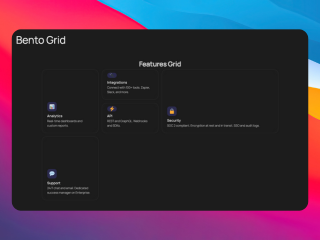
What you can build with this
- a reusable feature grid section
- a “problem → solution” grid
- a category-specific benefits section for different landing pages
AI prompt (copy/paste)
Paste this into your favorite UI/UX builder (Lovable, v0, Cursor, Claude):
You are a senior frontend engineer.

Build a production-ready React component for WordPress that I can upload as a ZIP to WP Render Blocks.

Component: feature grid / bento section (SEO-friendly, mostly static).

Requirements:
- One TSX component with a default export.
- SSR-safe: no window/document/localStorage during render.
- Render headings + descriptions as HTML in initial render (no JS required).
- Props (TypeScript) should support:
  - heading (string)
  - intro (string)
  - items: Array<{ title: string; description: string; }>
  - layout: "bento" | "grid"
  - emphasizedIndex?: number
- Semantic HTML: use <section>, <h2>/<h3>, <ul>/<li> where appropriate.
- Styling: Tailwind classes only; no external images; no dynamic class generation.
- No external network calls.

Deliverables:
- `FeatureGrid.tsx` (default export)
- minimal `package.json` (prefer zero deps)
- Example props JSON with 6 items.
Direct answer: what makes a feature grid SEO- and user-friendly?
- clear H2/H3 structure (headings match page intent)
- short descriptions with concrete language
- indexable HTML in page source (SSR) on pages that should rank
- no JS-heavy animation required to understand the content
Step 1: Map features to a single page intent
If the page is “React components in WordPress with SEO,” your grid should reinforce that theme.
Avoid “kitchen sink” grids that mix unrelated features.
Step 2: Write cards like mini FAQs
Each card should answer:
- what is this?
- why does it matter?
- who is it for?
Keep each card to:
- 1 short heading
- 1–2 sentence description
Step 3: Keep it indexable (SSR) for public landing pages
If the page is public and you want it indexed, render the grid as HTML in page source.
See: Server-Side Rendering (SSR) for WordPress: Why It Matters for SEO.
Step 4: Add a follow-up “how it works” or FAQ section
Feature grids create interest; FAQs remove friction.
FAQ guide: Build an SEO-Friendly FAQ Section in WordPress.
Common mistakes
Mistake: vague card copy
“Seamless integration” doesn’t help. Use concrete outcomes and constraints.
Mistake: animation-first UI
If the user needs the animation to understand the feature, you’re prioritizing style over comprehension.
Try building this with WP Render Blocks — upload your first component in under 5 minutes.
For a simpler reusable section, see how to build an announcement banner in WordPress that editors can update without code.
For the complete guide, see React Components in WordPress with Full SEO Support.
Summary
A feature grid is one of the easiest reusable blocks to ship:
- it improves clarity on landing pages
- it supports SEO by presenting relevant content clearly
- it doesn't require heavy JS
Treat it as structured content first.