
Build an Interactive Calculator in WordPress Without Sacrificing SEO
Interactive calculators can be great conversion tools, especially for pricing, sizing, and “is this worth it?” decisions.
The SEO problem is that many calculators are shipped as JS-only widgets with little to no indexable explanation.
What you can build with this
- a ROI calculator block
- a “time saved” estimator
- a pricing/sizing calculator
AI prompt (copy/paste)
Paste this into your favorite UI/UX builder (Lovable, v0, Cursor, Claude):
You are a senior frontend engineer.

Build a production-ready React component for WordPress that I can upload as a ZIP to WP Render Blocks.

Component: interactive calculator section with SSR-friendly content.

Requirements:
- One TSX component with a default export.
- SSR-safe: no window/document/localStorage during render.
- Render an explanation (heading + paragraphs + assumptions) as HTML in the initial render.
- The calculator UI can be interactive with useState, but should also render a sensible default state server-side.
- Props (TypeScript) should support:
  - heading (string)
  - intro (string)
  - assumptions: string[]
  - inputs: Array<{ key: string; label: string; defaultValue: number; min?: number; max?: number; }>
  - resultLabel (string)
- Styling: Tailwind classes only; no external images; no dynamic class generation.
- No external network calls.

Deliverables:
- `CalculatorSection.tsx` (default export)
- minimal `package.json` (prefer zero deps)
- Example props JSON with 3 numeric inputs.
Direct answer: how do you keep a calculator page indexable?
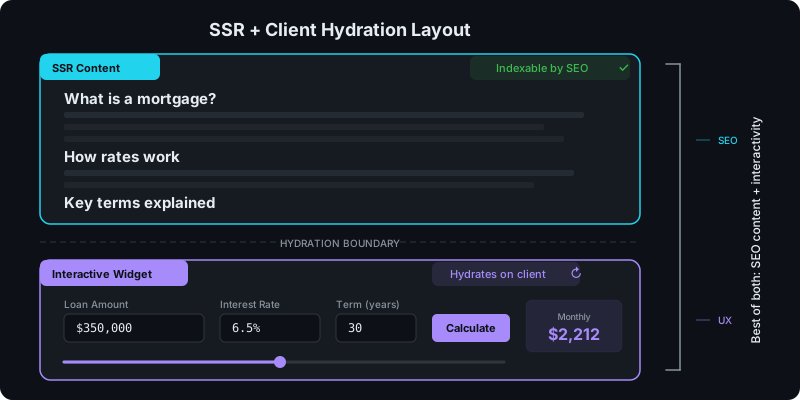
Separate the page into two parts:
- Indexable explanation (SSR, content in page source)
- Interactive widget (hydrate only the calculator UI)
Step 1: Write the explanation that answers the query
Before the widget, include:
- what the calculator is for
- how it works (inputs/outputs)
- what assumptions you’re using
This is what helps the page rank and what helps AI answer engines summarize your page correctly.
Step 2: Add the calculator UI as a component
The calculator UI can be interactive, but avoid making the entire page depend on JS.
Step 3: Use SSR for the surrounding content
If the page should be indexed, SSR the explanatory content. For a deeper explanation of why this matters, see Server-Side Rendering (SSR) for WordPress: Why It Matters for SEO.
See: CSR vs SSR in WordPress: When to Use Each.
Step 4: Test the page like a crawler would
For SEO pages:
- View page source
- Confirm the explanation text is present
The calculator UI can load later; the page should still be understandable without it.
Try building this with WP Render Blocks — upload your first component in under 5 minutes.
FAQ
Do I need a full headless setup for calculators?
Not necessarily. Many calculator pages work fine in WordPress if you keep content indexable and limit hydration to the interactive component.
How do I keep calculators fast?
- hydrate only what’s needed
- keep the UI simple
- optimize images and assets when you add them
For another interactive component pattern, see how to build a multi-step form in WordPress with React using the same SSR + hydration approach.
This is part of our React + WordPress guide.
Summary
Calculator pages can rank and convert when you:
- write the explanation as indexable content
- treat the widget as optional interactivity