
Build a Multi-Step Form in WordPress with React
Multi-step forms improve completion rates by breaking long forms into smaller, focused steps. But in WordPress, building one usually means choosing between a form plugin with limited customization or a custom block with significant PHP overhead.
A React component solves both problems: full control over the UI, and with SSR, the initial form state is indexable.
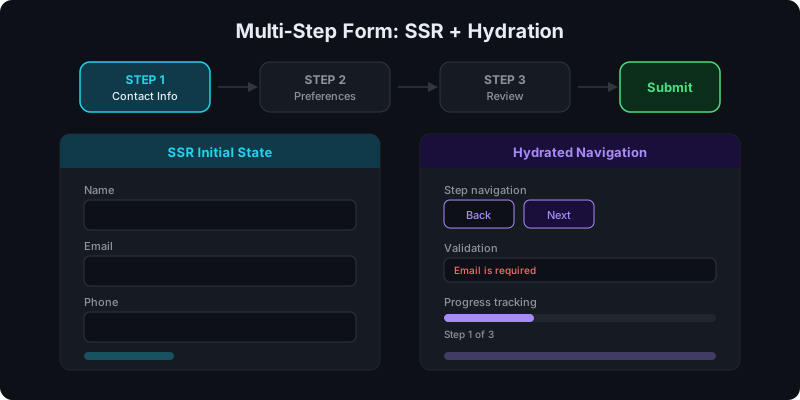
Direct answer: how does SSR work with a multi-step form?
Split the form into two layers:
- SSR layer -- renders the first step's fields, labels, and surrounding content as HTML in page source
- Hydration layer -- adds step navigation, validation, and form submission client-side
Crawlers see the form content. Users get full interactivity after hydration.
AI prompt (copy/paste)
Paste this into your favorite UI/UX builder (Lovable, v0, Cursor, Claude):
You are a senior frontend engineer.

Build a production-ready React component for WordPress that I can upload as a ZIP to WP Render Blocks.

Component: multi-step form with SSR-friendly initial state.

Requirements:
- One TSX component with a default export.
- SSR-safe: no window/document/localStorage during render.
- Render step 1 fields as HTML in the initial render (labels, inputs with default values, descriptions).
- Steps navigate with useState (hydrated client-side).
- Props (TypeScript) should support:
  - title (string)
  - steps: Array<{ label: string; fields: Array<{ key: string; label: string; type: "text" | "email" | "select" | "textarea"; required?: boolean; options?: string[]; }> }>
  - submitLabel (string)
  - successMessage (string)
- Include basic validation: required fields show an error before advancing.
- Styling: Tailwind classes only; no external images; no dynamic class generation.
- No external network calls. On submit, log form data to console.

Deliverables:
- `MultiStepForm.tsx` (default export)
- minimal `package.json` (prefer zero deps)
- Example props JSON with 3 steps, 2-3 fields each.
What you get with this approach
Step 1 renders server-side
The first step's content -- heading, field labels, descriptions -- is present in the page source. This matters for pages where the form itself is part of the content that should rank (lead generation pages, application forms, quote request forms).
Step navigation hydrates client-side
After the page loads, React hydrates the component and enables:
- moving between steps
- field validation before advancing
- progress tracking
- submit handling
This follows the same SSR + hydration pattern used in other interactive components. See: CSR vs SSR in WordPress: When to Use Each.
Structuring the steps
Keep each step focused:
- Step 1: Contact info -- name, email, phone (the fields you most want indexed for SEO if applicable)
- Step 2: Preferences -- selections, dropdowns, specifics
- Step 3: Review -- summary of inputs before submission
Avoid putting all fields in one step. The UX improvement is the reason for multi-step in the first place.
Validation strategy
Handle validation at the step level, not the form level:
- before advancing to the next step, validate all required fields in the current step
- show inline errors next to the relevant field
- keep validation logic in the component (no server round-trips during navigation)
Server-side validation still matters for the final submission, but step-level client validation improves the experience.
SSR considerations for forms
Forms have a specific SSR challenge: interactive elements (dropdowns, conditional fields, dynamic lists) only work after hydration. Design for this:
- render sensible defaults server-side (first option selected, empty fields with labels visible)
- don't hide critical content behind interactive-only states
- the form should be understandable (if not fully functional) without JavaScript
For more on keeping components SSR-safe: Security for User-Uploaded React Components.
Deploying the form
Once you have the component:
- ZIP the component files
- Upload to WP Render Blocks
- Add the block to any page in the Gutenberg editor
- Configure props (steps, labels, fields) per instance
Each instance can have different steps and fields. The same component serves multiple forms across multiple pages and sites.
See: How to Publish a React Component ZIP in WordPress and How to Share React Components Across Multiple WordPress Sites.
Try building this with WP Render Blocks — upload your first component in under 5 minutes.
FAQ
How do I handle form submission without network calls?
The component logs data to console by default. In production, you'd integrate with your backend via a POST request in a useEffect or event handler (client-side only, after hydration). This keeps the component SSR-safe.
Can I add conditional fields that show/hide based on previous answers?
Yes. Conditional rendering works in the hydrated state. For SSR, render the default state (conditions not yet triggered). The conditional logic activates after hydration.
How does this compare to WordPress form plugins?
Form plugins (WPForms, Gravity Forms) offer visual builders and built-in integrations. A React multi-step form gives you full control over the UI, SSR for indexable content, and the ability to version and deploy the form as a reusable component. See: Build an Interactive Calculator in WordPress Without Sacrificing SEO for a similar pattern.
For the complete guide, see React Components in WordPress with Full SEO Support.
Summary
Multi-step forms in WordPress work well as React components when you SSR the initial step for indexable content and hydrate for navigation and validation. Upload the component as a ZIP, configure steps via props, and reuse it across pages and sites.