
How to Use WP Render Blocks with WooCommerce
WooCommerce product pages are often the highest-revenue pages on a WordPress site, but they're also some of the hardest to customize with rich, interactive UI that stays indexable.
WP Render Blocks lets you drop custom React components into WooCommerce pages as Gutenberg blocks, with SSR keeping product content in page source for SEO. For an overview of the full workflow, see how to use React components in WordPress with SEO support.
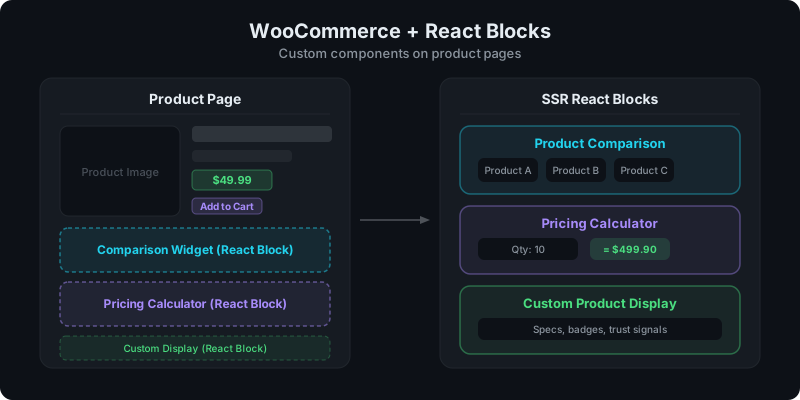
Direct answer: how do you add React components to WooCommerce?
Upload your React component as a ZIP to WP Render Blocks, then insert it as a Gutenberg block on any WooCommerce product page or template. Pass product data as props in the block editor. SSR renders the content as HTML in page source.
What you can build
Three categories of components work especially well on WooCommerce pages:
Product comparison widgets
Let shoppers compare products side by side with features, specs, and pricing. This content is high-intent and benefits from being indexable.
For the full comparison table guide: Build a Product Comparison Table in WordPress.
Pricing calculators
Quantity-based pricing, bulk discounts, or custom configuration calculators. These need interactivity (hydration), but the base layout and pricing tiers can still be SSR-rendered for SEO.
See: Build an Interactive Calculator Section in WordPress.
Custom product displays
Trust badges, spec tables, feature highlights, or styled product cards that go beyond what WooCommerce templates provide by default.
AI prompt for a WooCommerce comparison widget
Paste this into Lovable, V0, Cursor, or Claude:
You are a senior frontend engineer.

Build a production-ready React component for WordPress that I can upload as a ZIP to WP Render Blocks.

Component: Product comparison widget for WooCommerce pages.

Requirements:
- One TSX component with a default export.
- SSR-safe: no window/document/localStorage during render.
- Props (TypeScript):
  - heading (string)
  - products: Array<{
      name: string;
      price: string;
      features: string[];
      imageUrl?: string;
      ctaLabel?: string;
      ctaUrl?: string;
      highlight?: boolean;
    }>
  - columns: 2 | 3 | 4
- Render all product names, prices, and features as HTML in the initial render.
- Accessibility: semantic table or grid, clear headings.
- Styling: Tailwind classes only; responsive; no external images.
- No external network calls.

Deliverables:
- ProductComparison.tsx (default export)
- minimal package.json (prefer zero deps)
- Example props JSON with 3 products.
WooCommerce-specific considerations
Page structure and templates
WooCommerce uses its own template hierarchy. Your React blocks work in two places:
- Product page content area: via the Gutenberg block editor (WooCommerce uses blocks for product pages)
- Custom templates: if your theme uses Full Site Editing (FSE), you can place blocks in any template part
Avoiding conflicts with WooCommerce styles
WooCommerce ships its own CSS. Keep your component styles scoped:
- Use Tailwind utility classes or CSS modules
- Avoid global class names that might collide with
.woocommerceselectors - Test on a real product page, not just in isolation
Performance on product pages
WooCommerce pages already load more assets than a typical post. Be deliberate:
- Cache SSR output for repeat product views
- Hydrate only components that need interactivity (calculators, filters)
- Keep static product displays as SSR-only (no hydration)
For scaling strategies: Scaling React Rendering for WordPress Without Killing Performance.
Add React components to your WooCommerce store — get started with WP Render Blocks.
FAQ
Do I need to modify WooCommerce templates?
No. If you use the Gutenberg block editor for product pages, you insert WP Render Blocks components like any other block. No template file editing required.
Can I use the same component across multiple product pages?
Yes. Upload the component once and insert it on any product page. Pass different product data as props per page.
What about WooCommerce product archives (shop pages)?
Archive pages are typically handled by WooCommerce templates, not the block editor. For archive customization, consider using Full Site Editing templates or shortcode-based approaches.
Summary
WooCommerce pages benefit from custom React UI when:
- product comparisons, calculators, or custom displays need to be indexable
- styles stay scoped to avoid WooCommerce CSS conflicts
- SSR keeps content in page source for product-related searches
- hydration is reserved for truly interactive components
Upload the component, insert the block, pass product data as props.