
How to Use Lovable Components in WordPress (With SSR)
Lovable generates polished React components from natural language prompts. The output is standard React with Tailwind CSS. You can also generate components with Cursor AI. The gap is getting those components into WordPress as indexable, SEO-friendly content rather than client-only JavaScript.
WP Render Blocks closes that gap: upload the Lovable output as a ZIP, and it becomes an SSR-rendered Gutenberg block.
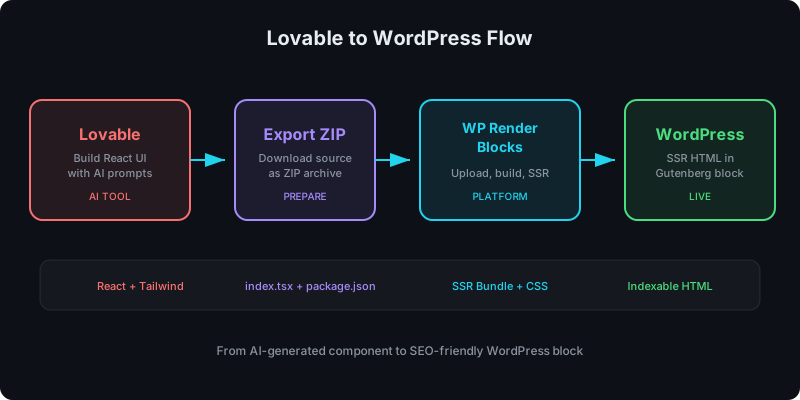
Direct answer
Export your Lovable component source, create a ZIP with index.tsx and package.json, upload it to WP Render Blocks, and publish it as a Gutenberg block with server-rendered HTML. The process takes under 10 minutes.
What Lovable outputs
Lovable generates React components (TypeScript/JSX) styled with Tailwind CSS. Typical output includes:
- One or more
.tsxfiles with component logic - Tailwind utility classes for styling
- Dependencies on common libraries (React, sometimes Lucide icons, Radix primitives)
This output is already close to what WP Render Blocks expects. The main adjustments are packaging and SSR safety.
Step-by-step workflow
1) Build your component in Lovable
Use a prompt that specifies SSR-safe constraints. This reduces cleanup later:
Build a React component for a hero section with a headline, subtext, and CTA button.
Requirements:
- Single TSX file with a default export
- Use Tailwind CSS for styling
- Do not use window, document, or localStorage during render
- All text content must be in the initial HTML render (no client-only state for visible text)
- Accept props for headline, subtext, and buttonLabel
Adding the SSR constraints to the prompt prevents most common issues upfront.
2) Export the component source
In Lovable, download or copy the component source code. You need:
- The main component file (rename it to
index.tsxif it is not already) - Any additional files the component imports
3) Create the ZIP
Create a folder with this structure:
my-component/
  index.tsx        # default export component
  package.json     # dependencies
Your package.json should list the dependencies Lovable used:
{
  "name": "my-hero-section",
  "version": "1.0.0",
  "dependencies": {
    "react": "^18.0.0",
    "lucide-react": "^0.300.0"
  }
}
Do not include node_modules/, .env files, or build artifacts. ZIP the folder contents.
For the complete ZIP preparation guide, see: From ZIP to WordPress: Publish a React Section That's SEO-Friendly.
4) Upload to WP Render Blocks
Log in to WP Render Blocks, click New Component, and upload the ZIP. The build pipeline validates the package, installs dependencies, and creates SSR + client bundles.
If you do not have an account yet, see: Getting Started with WP Render Blocks.
5) Publish in Gutenberg
Open the Gutenberg editor on your WordPress site. Search for the component in the block inserter, add it to the page, configure props, and publish.
The page source will contain the rendered HTML, making the content indexable by search engines.
Lovable-specific issues to watch for
Browser-only APIs
Lovable sometimes generates components that read window.innerWidth or use document.querySelector during render. These break SSR. Move them into useEffect or behind a typeof window !== "undefined" guard.
Heavy dependency chains
Some Lovable outputs pull in animation libraries or chart packages that add significant bundle weight. Review package.json before uploading and remove anything the component does not actually use.
For dependency safety practices, see: Using AI-Generated React Components in WordPress (Safely).
Tailwind CSS
WP Render Blocks handles Tailwind classes natively. No extra Tailwind configuration is needed in your ZIP. The build pipeline processes the utility classes and extracts the CSS.
Client-side interactivity
If your Lovable component has interactive features (dropdowns, tabs, modals), those still work. SSR provides the initial HTML, and the client bundle hydrates for interactivity. The key is that the initial render must not depend on browser APIs.
Upload your AI-generated components to WP Render Blocks and publish them as SSR Gutenberg blocks.
FAQ
Can you use Lovable components in WordPress?
Yes. Export the component source from Lovable, package it as a ZIP with a package.json, upload to WP Render Blocks, and it renders as an SSR Gutenberg block in WordPress.
Does Lovable output SSR-safe components?
Often, but not always. Lovable components may use browser APIs or client-side state that needs adjustment for server rendering. Test the SSR build and fix any window/document references in the render path.
What about Tailwind CSS in Lovable components?
WP Render Blocks supports Tailwind natively. The build pipeline processes Tailwind classes and extracts the CSS automatically. No extra configuration needed in your ZIP.
This is part of our React + WordPress guide.
Summary
Lovable generates production-quality React components. WP Render Blocks turns them into SSR-rendered Gutenberg blocks. The workflow is: build in Lovable, export source, create a clean ZIP, upload, and publish. Add SSR constraints to your Lovable prompts to minimize cleanup, and review dependencies before shipping to production.