
How to Use Cursor-Generated React Components in WordPress
Cursor is becoming a primary tool for developers who want to generate React components quickly using AI-assisted coding. The challenge is getting those components from your editor into a live WordPress page with SEO-friendly output.
This guide covers the full workflow: Cursor project setup, component generation, preparation for upload, and deployment via WP Render Blocks.
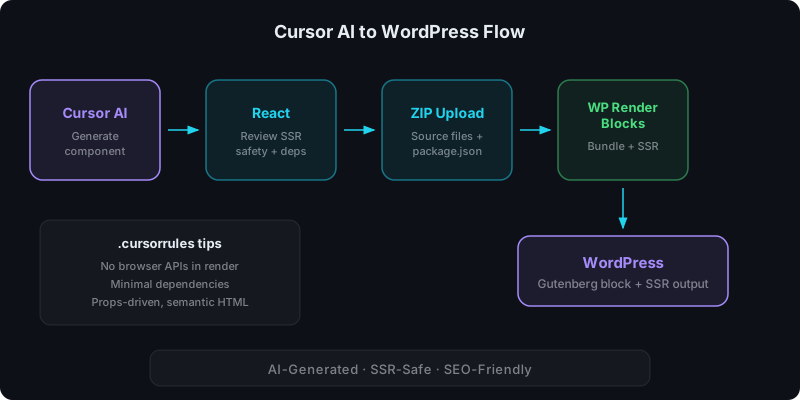
Direct answer: what is the workflow?
- Generate or build a React component in Cursor
- Verify it is SSR-safe (no browser-only APIs during render)
- Export source files as a ZIP (no
node_modules, no build artifacts) - Upload the ZIP to WP Render Blocks
- Add the component as a Gutenberg block and configure props
- Publish with SSR output for indexable pages
Setting up Cursor for WordPress-ready components
Use a .cursorrules file
Cursor respects project-level rules via .cursorrules. This is the most effective way to steer AI output toward SSR-safe, WordPress-compatible components.
A practical .cursorrules for WP Render Blocks projects:
- Components must be SSR-safe: no window, document, localStorage, or navigator during render
- Move all browser-only logic into useEffect or guard with typeof window !== "undefined"
- Keep dependencies minimal. Avoid large UI framework libraries unless explicitly requested
- Use semantic HTML (headings, lists, links) for SEO
- Components should be props-driven: all content passed via props, no hardcoded data
- Export a single default component per file
- Do not include node_modules or build artifacts
This reduces cleanup significantly. Without it, Cursor may generate components that look correct but crash during server-side rendering.
Project structure
Keep the project structure clean for upload:
my-component/
  package.json
  src/
    index.tsx       (or index.jsx)
    Component.tsx
WP Render Blocks expects source files and a package.json. No dist/, no .next/, no node_modules/.
Common Cursor patterns that work well
Presentational sections
Cursor excels at generating presentational components: hero sections, feature grids, pricing tables, testimonial cards. These are typically stateless, props-driven, and SSR-safe by default.
Example prompt in Cursor:
Create a React component for a feature comparison table. Props: title (string), features (array of {name, free, pro} objects). Use semantic HTML. No external dependencies.
Landing page blocks
Full landing page sections with responsive layouts are a strong use case. Cursor generates clean Tailwind or inline-styled components that map directly to Gutenberg blocks.
See also: SEO-Friendly React Components Without Building Custom Blocks.
Cursor-specific tips
Give Cursor project context
Cursor performs better when it has context about your existing components. If you already have uploaded components via WP Render Blocks, keep examples in your project so Cursor can reference the pattern.
Use Composer for multi-file components
For components that need helper files (utilities, sub-components), use Cursor's Composer mode. It handles multi-file generation better than inline chat for complex structures.
Review dependencies before upload
Cursor sometimes adds packages that are unnecessary or SSR-unsafe. Before zipping:
- Check
package.jsonfor unexpected dependencies - Remove anything not actually imported
- Verify no packages require Node.js server APIs
For the full safety checklist: Using AI-Generated React Components in WordPress (Safely).
Preparing the ZIP for upload
- Remove
node_modules/,dist/,.next/, and any build artifacts - Ensure
package.jsonlists only required dependencies - Verify the main component exports a default function
- ZIP the project folder
Upload the ZIP in the WP Render Blocks dashboard. The platform builds and bundles the component automatically.
For the upload workflow: From ZIP to WordPress: Publish a React Section That's SEO-Friendly.
Verifying SSR output
After uploading and adding the component to a page:
- Open the published page
- View page source
- Confirm the component's content appears as HTML
If the content is missing from page source, the component likely uses browser-only APIs during render. Check for window, document, or navigator references outside of useEffect.
See: CSR vs SSR in WordPress: When to Use Each.
Upload your AI-generated components to WP Render Blocks and publish them as SSR Gutenberg blocks.
FAQ
How is Cursor different from Lovable or V0 for this workflow?
Cursor is an IDE, so you have full control over project structure, dependencies, and file organization. Lovable and V0 generate complete apps or components from prompts with less granular control. For WordPress component workflows, Cursor gives you more precision over SSR safety and dependency management. For Vercel's AI tool, see how to use V0 components in WordPress.
Can I use Cursor with TypeScript components?
Yes. WP Render Blocks handles TypeScript during the build process. Export your .tsx files directly in the ZIP.
What if my Cursor component uses Tailwind CSS?
Tailwind utility classes work with WP Render Blocks. Include your Tailwind config in the ZIP if you use custom theme values. The build pipeline processes Tailwind during bundling.
This is part of our React + WordPress guide.
Summary
Cursor is a strong fit for generating WordPress-ready React components when you set up the project correctly:
- use
.cursorrulesto enforce SSR safety and minimal dependencies - keep the project structure clean for ZIP upload
- review dependencies before uploading
- verify SSR output in page source after deployment