
Alternatives to Custom React Builds in WordPress
When people say “React in WordPress,” they can mean very different things.
This guide lays out the real alternatives, what they’re good at, and how to choose based on SEO and maintenance, not ideology.
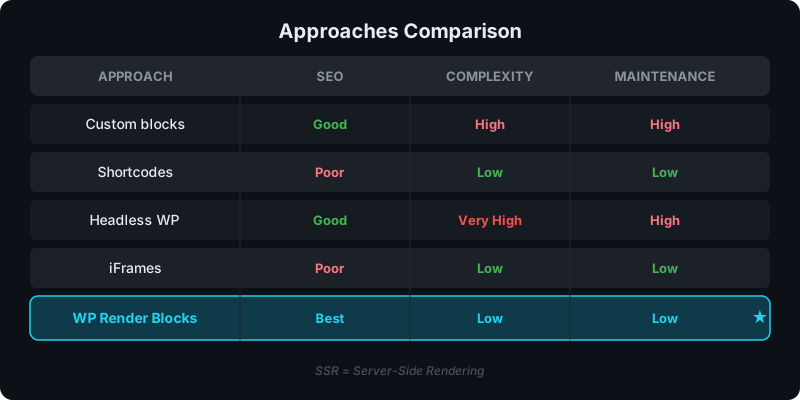
Direct answer: what’s the best alternative depends on your goal
- Need fast interactive UI and SEO doesn’t matter → CSR embed is fine
- Need indexable content on public pages → use SSR output
- Need deep Gutenberg editor-native behavior → custom blocks
- Need a full React frontend platform → headless
Option 1: Client-side embeds (CSR)
This is the most common “quick win”:
- add a placeholder element
- load a JS bundle
- render the component in the browser
Best for
- dashboards and logged-in tools
- widgets where SEO isn’t required
Weak for
- indexable content pages (content may not exist in page source)
See: CSR vs SSR in WordPress.
Option 2: Iframes
Iframes isolate UI and reduce conflicts, but:
- content is not part of the page source
- styling and responsive behavior can be awkward
Best for
- isolated apps and tools
Weak for
- content SEO and integrated page layout
Option 3: Custom Gutenberg blocks
Custom blocks are the “WordPress-native” solution:
- great editor integration
- good long-term for productized blocks
Cost
- each component becomes a block project
- ongoing maintenance across WordPress releases
Comparison: WP Render Blocks vs Custom Gutenberg Blocks.
Option 4: Headless WordPress
Headless is a platform change:
- WordPress as content storage
- Next.js (or similar) renders the site
Best for
- sites that want a fully custom React frontend
Cost
- more moving parts, different editor preview workflows, new deployment responsibilities
See: WP Render Blocks vs Headless WordPress.
Option 5: SSR components embedded into WordPress (WP Render Blocks)
This is a middle path:
- keep WordPress as the site
- ship React components with SSR output for indexable pages
- optionally hydrate for interactivity
Start here: How to Use React Components in WordPress with Full SEO Support.
See how WP Render Blocks compares — start with the free tier.
FAQ
What should I choose for a marketing site that must rank?
Prefer SSR output so content exists in page source.
What should I choose for an internal dashboard?
CSR is often simplest and fully acceptable.
If you're evaluating page builders specifically, see how WP Render Blocks compares to Elementor and Divi custom modules.
Summary
There isn't one "best" way to use React in WordPress.
Choose based on:
- whether the page needs to be indexed
- how many components/sites you need to maintain
- whether you need WordPress-native editor behavior