
WP Render Blocks vs Headless WordPress
Headless WordPress is a powerful pattern, but it's also a platform decision.
If your actual problem is "ship React UI into WordPress pages without losing SEO," you may not need to rebuild your site architecture. This is part of our React + WordPress guide.
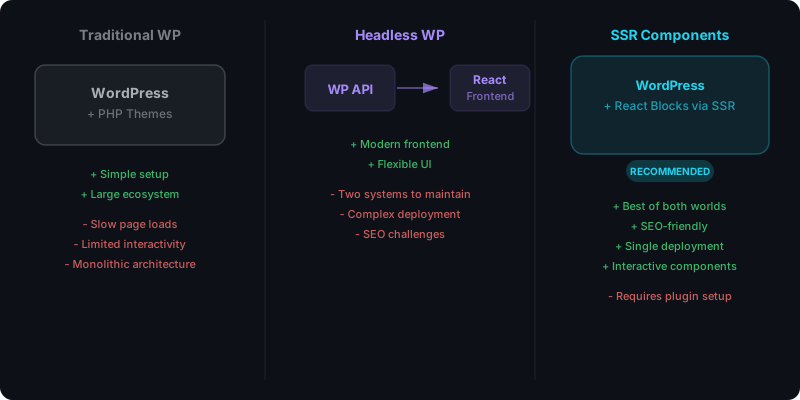
Direct answer: when to choose headless vs WP Render Blocks
Choose headless WordPress when you want WordPress to be content storage and you want a separate frontend application (Next.js, etc.) to own routing, rendering, caching, and deployment.
Choose WP Render Blocks when you want to keep WordPress as the site (themes, plugins, Gutenberg), but you need React components that output indexable HTML via SSR.
For a broader view of all approaches (iframes, embeds, custom blocks, headless, SSR), see Alternatives to Custom React Builds in WordPress.
What headless WordPress actually changes
Headless isn't just "React + WordPress." It changes:
- hosting and deployment pipeline
- preview and editorial workflow
- caching strategy (and where it lives)
- authentication and personalization
- responsibility boundaries (what breaks where)
For many agencies, the biggest risk is adopting headless for a project that doesn’t need it.
What WP Render Blocks changes (and what it doesn’t)
WP Render Blocks is intentionally narrower:
- WordPress stays WordPress
- React components are uploaded and rendered to HTML where needed
- Gutenberg stays the editing experience
This is especially useful for teams that:
- ship many landing page sections
- run growth experiments
- reuse UI across multiple client sites
If the core question is CSR vs SSR (rather than headless vs not), see CSR vs SSR in WordPress: When to Use Each for a rendering-focused decision guide.
SEO and indexability: both can be good, if you do SSR correctly
Headless sites often use SSR/SSG by default, which helps indexing.
WP Render Blocks achieves the same core requirement inside WordPress:
- SSR output means content exists in page source
See: Server-Side Rendering (SSR) for WordPress: Why It Matters for SEO.
Decision checklist (practical)
Choose headless if…
- you want a custom frontend beyond WordPress pages
- your site is more “app” than “CMS site”
- you need multi-channel delivery (web/app/etc.) from one content source
- you have engineering capacity to own the platform
Choose SSR components inside WordPress if…
- WordPress already works for your site and your editors
- you mainly need reusable UI sections
- you want SEO-friendly HTML without client-only rendering
- you want simpler operations across many sites
For a comparison with Elementor and Divi, see our detailed breakdown of WP Render Blocks vs page builder custom modules.
See how WP Render Blocks compares — start with the free tier.
FAQ
Can I do both?
Yes. Some teams use WordPress traditionally for marketing pages and run headless for a separate app experience. But that increases complexity.
Is headless always faster?
Not automatically. Headless performance depends on your build strategy, caching, and how much JS you ship. Traditional WordPress with SSR components can be very fast too.
Summary
Headless WordPress is a great solution when you truly need a full custom frontend platform.
If your goal is "React components in WordPress pages with predictable SEO," SSR component rendering can be the simpler and faster path. Get started with WP Render Blocks to try the non-headless approach.