
WP Render Blocks vs Custom Gutenberg Blocks
If you're deciding between building custom Gutenberg blocks or using WP Render Blocks, the best approach is to decide based on the type of work you're doing:
- deep editor-native blocks (WordPress product work)
- reusable UI sections shipped quickly (component operations)
Both are valid. They optimize for different outcomes.
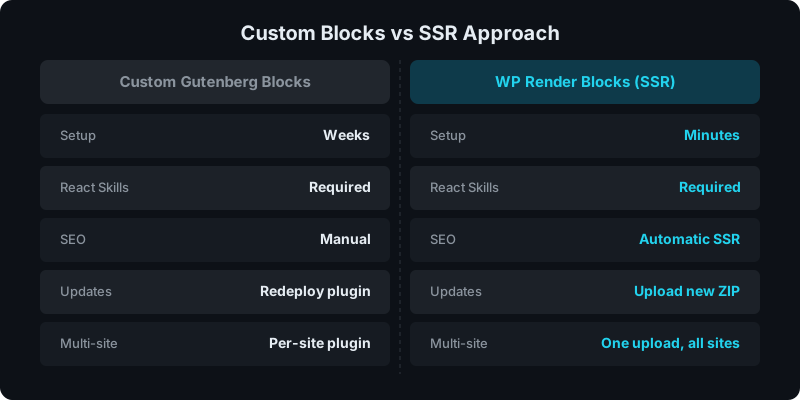
Direct answer: when should you choose which?
Choose custom Gutenberg blocks when you need WordPress-native editor behavior (inner blocks, rich text tooling, transforms, tight integration).
Choose WP Render Blocks when you want to upload React components and reuse them across pages/sites with:
- SSR output for indexable pages
- centralized versioning + rollbacks
- per-site connection and governance
What you’re really building in each approach
With custom blocks, you’re building a WordPress plugin
That includes:
- block registration, attributes, and editor UI
- build tooling and compatibility maintenance
- distribution (updates, deployments, client installations)
This can be a great fit for productized plugins or teams with strong WP block expertise.
With WP Render Blocks, you’re operating a component library
That includes:
- bundling and versioning of components
- release management (active vs pinned)
- multi-site governance and access control
This is a better fit for agencies and teams shipping many sections quickly.
SEO comparison (SSR vs CSR)
SEO depends on indexable HTML:
- If the content must rank, SSR output is the safer default
- CSR is fine for non-indexed pages (dashboards, internal tools)
See: Server-Side Rendering (SSR) for WordPress: Why It Matters for SEO and CSR vs SSR in WordPress.
Maintenance and scale
When you have 5 components
Custom blocks can be fine, especially if each block is unique and editor-heavy.
When you have 50 components
The cost flips:
- every component becomes another block project
- updates become harder to coordinate across sites
- rollbacks require more careful plugin/version management
That’s where central versioning and controlled rollouts become valuable.
See: How Versioning Works for React Components in WordPress.
Editor experience
Custom blocks are unmatched when you need:
- inner blocks
- rich text controls
- block transforms and patterns
- deep editor integrations
WP Render Blocks focuses on:
- Gutenberg-native selection and prop configuration for uploaded components
- fast iteration without rebuilding each component as a bespoke block
See: How to Render React Components in WordPress Gutenberg.
See how WP Render Blocks compares — start with the free tier.
FAQ
Can I mix both approaches?
Yes. Many teams will:
- use custom blocks for “editor-native” content structures
- use component rendering for reusable UI sections and experiments
Which is better for agencies?
Agencies typically benefit from centralized versioning, multi-site governance, and faster iteration, especially when shipping many client variations.
See: How to Share React Components Across Multiple WordPress Sites.
For a step-by-step migration path, see how to migrate custom Gutenberg blocks to WP Render Blocks.
For the complete guide, see React Components in WordPress with Full SEO Support.
Summary
Custom Gutenberg blocks are ideal when your primary challenge is WordPress editor-native behavior.
WP Render Blocks is ideal when your primary challenge is shipping and operating a reusable React component library across many WordPress sites with predictable SSR output and safe release controls.