
WP Render Blocks vs Elementor / Divi Custom Modules
Page builders like Elementor and Divi are excellent tools for building WordPress sites quickly. They cover a wide range of use cases with drag-and-drop editors, pre-built widgets, and template libraries.
The question isn't whether page builders are good. It's when they stop being enough for the custom UI you need to ship.
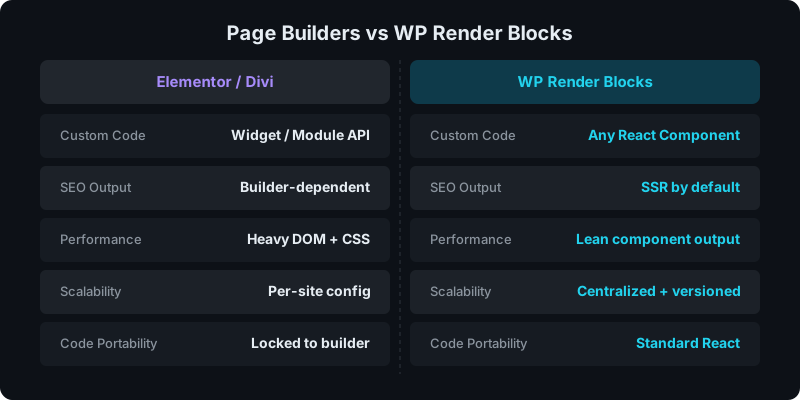
Direct answer: when should you choose which?
Choose Elementor / Divi when you need:
- fast content pages with pre-built widgets
- client-friendly visual editing
- standard layouts without custom development
Choose WP Render Blocks when you need:
- custom React components (pricing tables, calculators, comparison grids)
- SSR output for SEO-critical pages
- centralized versioning and multi-site deployment
- portable code that isn't locked to a builder
Where page builders work well
Page builders solve a real problem: non-developers need to build and edit pages without writing code. For that, they're great.
Common use cases where page builders are the right tool:
- marketing landing pages with standard layouts
- blog post templates
- contact pages and basic forms
- sites where the client manages content directly
If your site fits these patterns, a page builder is likely the simpler choice.
Where page builders hit limits
The friction starts when you need custom interactive UI that doesn't fit the builder's widget library:
- a multi-step calculator that needs specific logic
- a product comparison table with dynamic filtering
- an interactive pricing section with toggles and tiers
- any component that would benefit from React's state management
At this point, page builder options are:
- Custom widgets/modules -- requires learning the builder's proprietary API (Elementor's widget API, Divi's module API). Your code is locked to that builder.
- HTML/shortcode blocks -- fragile, no SSR, hard to maintain across sites.
- Third-party plugins -- adds dependencies and potential conflicts.
What WP Render Blocks offers instead
WP Render Blocks takes a different approach: upload a React component as a ZIP, and it becomes a Gutenberg block with SSR output.
Key differences:
- Standard React -- no proprietary widget API to learn. Your components are portable.
- SSR by default -- content is present in page source for indexable pages. See: Server-Side Rendering (SSR) for WordPress: Why It Matters for SEO.
- Centralized versioning -- update a component once, roll it out across all connected sites. See: How Versioning Works for React Components in WordPress.
- AI-compatible -- generate components with Lovable, v0, Cursor, or Claude and upload them directly. See: How to Use AI-Generated React Components in WordPress Safely.
Performance considerations
Page builders add significant DOM weight: wrapper divs, inline styles, and builder-specific CSS. This compounds on complex pages.
WP Render Blocks renders clean component output. The HTML is what your React component produces -- nothing more.
For performance-critical pages, see: Scaling WordPress SSR React Performance.
Code portability
This is the long-term consideration most teams underestimate.
- Page builder code is tied to that builder. Switching from Elementor to Divi (or vice versa) means rebuilding custom modules.
- React components are standard. The same component that works in WP Render Blocks could work in any React environment.
If you're building a component library for an agency, portability matters. See: How to Share React Components Across Multiple WordPress Sites.
See how WP Render Blocks compares — start with the free tier.
FAQ
Can I migrate custom Elementor widgets to WP Render Blocks?
Not directly -- they're different APIs. But if the underlying logic is straightforward, rebuilding as a React component is often faster than maintaining a proprietary widget.
Do I need to know React to use WP Render Blocks?
You need React components, but you don't need to write them from scratch. AI tools can generate production-ready components that you upload as ZIP files.
What about the editor experience?
Page builders offer visual, in-context editing. WP Render Blocks focuses on Gutenberg-native block selection with prop configuration. The tradeoff is flexibility over visual drag-and-drop.
For the complete guide, see React Components in WordPress with Full SEO Support.
Summary
Page builders are the right tool for standard content pages with visual editing needs. WP Render Blocks is the right tool when you need custom React components with SSR output, version control, and multi-site governance.
They solve different problems. Many teams will use both.