
How to Add SEO-Friendly React Components to WordPress Without Custom Blocks
If you’ve built custom Gutenberg blocks, you know they can be the “right way” in WordPress.
You also know the hidden cost: every new component becomes a new block engineering project.
For many freelancers and agencies, that doesn’t scale, especially when the UI is coming from React components (often AI-generated) that change frequently.
Direct answer: how do you avoid custom blocks and still get SEO?
Use a workflow where:
- React components are uploaded as components (not rewritten as blocks)
- Gutenberg is the editor/configuration layer
- the frontend output is SSR HTML for indexable pages
That gives you:
- reusable components
- native WordPress editing
- crawlable HTML in page source
Why custom blocks don’t scale for many components
Custom blocks are great when you need:
- WordPress-native patterns (inner blocks, rich-text behaviors, transforms)
- deep editor integration
- standalone plugin distribution
They become expensive when you’re shipping:
- dozens of marketing sections
- many client variations
- rapid experiments
Because you end up maintaining:
- block registration and attribute schemas
- editor UI per block
- compatibility across WordPress releases
- build tooling and distribution
Why headless WordPress is often overkill for this problem
Headless solves “I want a React app for my site.” It also changes:
- hosting model
- preview workflow
- caching layers
- operational responsibility
If your goal is “ship React UI into WordPress pages with SEO,” SSR components inside WordPress can be enough.
See: WP Render Blocks vs Headless WordPress .
The SSR component approach (WP Render Blocks)
WP Render Blocks is designed as a middle path:
- keep WordPress as WordPress (Gutenberg, themes, plugins)
- upload React components as ZIPs
- render SSR HTML for pages that should rank
- optionally hydrate for interactivity
Start here: How to Use React Components in WordPress with Full SEO Support.
What “SEO-friendly” means in this context
For React-driven content in WordPress:
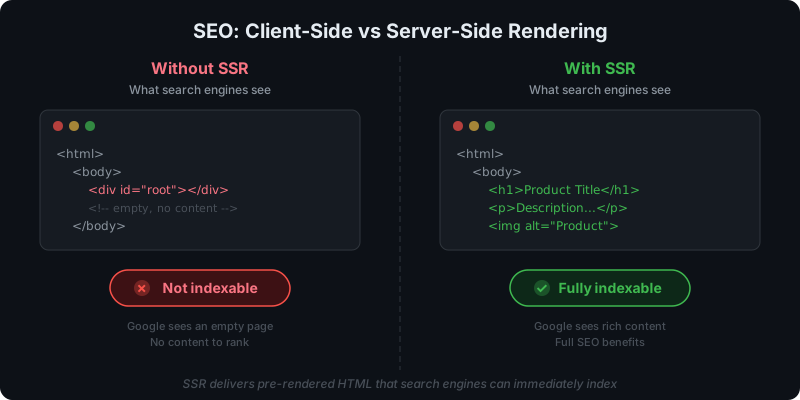
- SSR means content exists in the HTML response (page source)
- CSR means content appears after JS executes
If the page must be indexed, SSR is the safer default.
See: Server-Side Rendering (SSR) for WordPress: Why It Matters for SEO and CSR vs SSR in WordPress.
A practical implementation path
Step 1: Build or generate the component
Use your normal workflow (design system, internal codebase, or AI tool export).
Step 2: Upload as a ZIP (with minimal dependencies)
Keep dependencies intentional. Treat package.json as a security boundary, not a convenience list.
See: Using AI-Generated React Components in WordPress (Safely).
Step 3: Configure props in Gutenberg
Editors choose a component and configure props as block attributes.
See: How to Render React Components in WordPress Gutenberg.
Step 4: Publish and verify page source
For SEO pages, verify that content exists in HTML:
- View page source
- Confirm meaningful text is present
For a thorough verification process including Search Console checks, see how to verify your React components are indexed.
When custom blocks are still the right call
Custom blocks make sense when:
- you need nested structures (inner blocks)
- you rely on WordPress-specific transforms and editor UX
- the block must ship without any external rendering service
This is why “avoid custom blocks” is not a universal rule. It’s a scale and maintenance decision.
Get SSR rendering for your React components with WP Render Blocks.
FAQ
Can I still get rich editing controls without custom blocks?
Yes, but they’ll be constrained by the prop schema and what your integration supports. For many marketing components, that’s enough.
Is this approach compatible with caching plugins?
If SSR output is HTML, it can be cached like any other HTML page output. Caching strategy depends on props variability and personalization.
For caching strategies, see: Scaling React Rendering for WordPress Without Killing Performance.
Summary
If your goal is to ship lots of React UI into WordPress quickly (without sacrificing indexability), rebuilding every component as a custom Gutenberg block is often the slow path.
See our guide on building product comparison tables with built-in SEO schema for a concrete example of this approach.
The scalable path is:
- SSR for indexable pages
- Gutenberg as the editor layer
- component uploads + versioning + rollbacks