
Rate Limiting SSR APIs for WordPress: Best Practices
If your WordPress plugin requests SSR HTML from an API, you're running a service endpoint that can be:
- abused
- overloaded
- used in unexpectedly expensive ways
Rate limiting is how you keep it reliable and predictable.
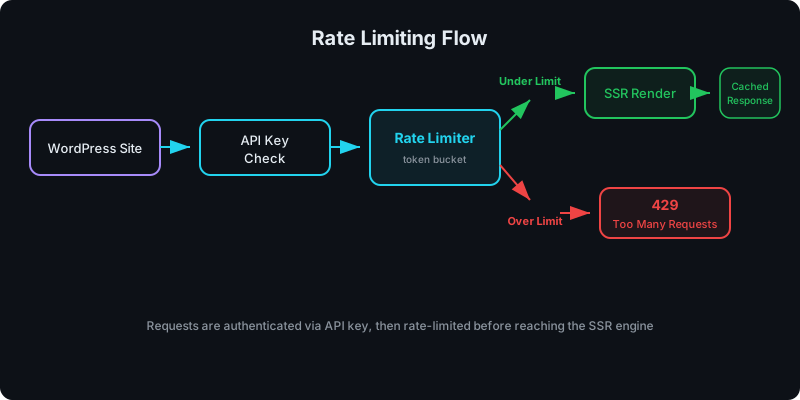
Direct answer: how should you rate limit SSR rendering?
At minimum:
- rate limit per site credential
- add per-IP controls as a secondary signal (optional)
- cache SSR output so repeat requests don’t re-render
What problem are we solving?
SSR render calls are typically more expensive than static file requests:
- they can execute code
- they may need to load bundles/dependencies
- they can vary by props
For context on why SSR is worth the cost, see Server-Side Rendering (SSR) for WordPress: Why It Matters for SEO. Without rate limits, a single misconfigured site or bot can degrade service quality for everyone.
What to rate limit on
Primary: per-site credential
This maps cleanly to:
- governance and revocation
- multi-site usage visibility
See: How to Share React Components Across Multiple WordPress Sites.
Secondary: per-IP (optional)
Per-IP can help with abuse, but be careful:
- NAT and shared networks can create false positives
- some hosts put many users behind a small set of IPs
Caching strategy (the other half of “rate limiting”)
Caching is what makes “rate limit” feel invisible to normal users.
Cache dimensions typically include:
- component slug + version
- props hash (or normalized props string)
If you cache SSR output well, you rate-limit “unique renders” more than “pageviews.”
Common pitfalls
Pitfall: rate limiting without clear errors
If you return vague errors, site owners can’t debug.
Return:
- explicit status codes
- retry hints
- a stable error format
Pitfall: no separation between build and origin render limits
Build pipelines and render endpoints have different risk profiles. Treat them separately. Security considerations for uploaded code are covered in Why Running User-Uploaded React Code Is Dangerous (And How We Secure It).
Get SSR rendering for your React components with WP Render Blocks.
FAQ
How do I choose limits?
Start with:
- baseline per-site limits
- observe real traffic patterns
- adjust with caching and burst allowances
Does this affect SEO?
Your public pages should still be served normally. Rate limiting primarily protects the SSR API behind the WordPress integration and keys.
For the complete guide to using React in WordPress with SEO, see React Components in WordPress with Full SEO Support.
Summary
Rate limiting SSR APIs is not optional at scale:
- limit by site credential
- cache SSR output aggressively
- keep error responses actionable
For broader performance strategies, see Scaling React Rendering for WordPress Without Killing Performance. If you're deploying on Vercel, see how to deploy React SSR components on Vercel with edge caching.
It's one of the simplest ways to protect reliability and cost as more sites adopt SSR components.