
How to Migrate from Custom Gutenberg Blocks to WP Render Blocks
Teams with existing custom Gutenberg blocks face a real question: is it worth migrating to a component-based workflow, or does the migration cost outweigh the benefit?
The answer depends on what you're maintaining and where the pain is.
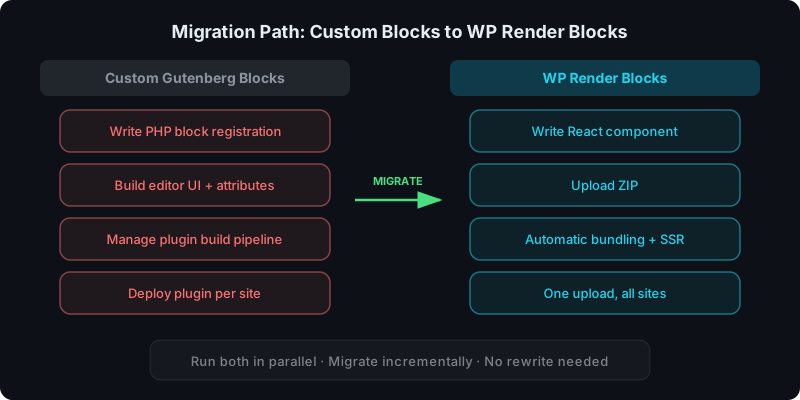
Direct answer: what does migration actually look like?
Migration is not a rewrite. It's a gradual shift:
- First, follow the plugin setup guide to install WP Render Blocks alongside your existing block plugins
- Upload new components as ZIPs instead of building new custom blocks
- Use WP Render Blocks for new pages and sections
- Retire old custom blocks over time as content gets refreshed
You do not need to touch existing pages. Both systems coexist in Gutenberg.
What changes when you migrate
Build and deploy workflow
With custom blocks, you maintain a WordPress plugin project: block registration, attributes, editor UI, build tooling, and per-site deployments.
With WP Render Blocks, you upload a React component ZIP. The platform handles bundling, versioning, and distribution. No plugin build pipeline per component.
SSR output
Custom blocks require you to implement server-side rendering yourself (typically via render_callback in PHP or static block output). If you skip it, content is CSR-only.
WP Render Blocks provides SSR output by default on eligible plans. Content appears in page source without extra work.
See: Server-Side Rendering (SSR) for WordPress: Why It Matters for SEO.
Multi-site distribution
Custom blocks require deploying the plugin to every site individually. Version coordination is manual.
WP Render Blocks uses centralized versioning: upload once, connect sites, control rollouts per site.
See: How to Share React Components Across Multiple WordPress Sites.
What stays the same
- Gutenberg is still your editor. Editors still add blocks, configure settings in the sidebar, and publish pages the same way.
- React is still your component language. Your existing React code is the starting point. You are not learning a new framework.
- SEO fundamentals are unchanged. Indexable pages need HTML in page source. The rendering method changes, not the goal.
How to run both in parallel
The safest migration strategy is incremental:
- Keep existing custom blocks active. Do not remove them.
- Use WP Render Blocks for new components. Any new section, landing page, or UI experiment goes through the upload workflow.
- Identify candidates for retirement. Look for custom blocks that are simple, rarely updated, and have no deep editor dependencies (inner blocks, transforms).
- Replace gradually. When a page gets redesigned or refreshed, swap in the WP Render Blocks version.
This avoids the "big bang rewrite" problem entirely.
When custom blocks are still the right tool
Not everything should migrate. Custom blocks remain the better choice when:
- You need inner blocks. Nested block structures require Gutenberg-native APIs.
- You need rich text controls. Inline formatting, link insertion, and text toolbars are Gutenberg-specific.
- You need block transforms. Converting between block types requires the WordPress block registration system.
- You distribute a standalone plugin. If your block is a product (not an internal tool), WordPress plugin distribution makes more sense.
For the full comparison: WP Render Blocks vs Custom Gutenberg Blocks.
Migration checklist
Before migrating a specific component:
- Confirm it does not rely on inner blocks or block transforms
- Verify it can render without browser-only APIs (SSR-safe)
- Package it as a clean ZIP with
package.jsonand source files - Upload to WP Render Blocks and test SSR output
- Validate page source on a staging site before production
For the upload workflow: From ZIP to WordPress: Publish a React Section That's SEO-Friendly.
Start migrating today — create your free WP Render Blocks account.
FAQ
How long does migration take per component?
For a typical presentational component (pricing table, feature grid, hero section), migration takes minutes: package the ZIP, upload, configure props, verify output. Editor-heavy blocks with inner blocks or transforms may not be candidates at all.
Do I need PHP knowledge to use WP Render Blocks?
No. The WP Render Blocks workflow is React-only on the component side. The WordPress plugin handles the connection. No PHP block registration or render callbacks needed.
See: How to Render React Components in WordPress Gutenberg.
Can I migrate AI-generated components too?
Yes. AI-generated components from Lovable, V0, Cursor, or Claude follow the same upload workflow. Review them for SSR safety and dependency hygiene first.
See: Using AI-Generated React Components in WordPress (Safely).
For the complete guide to React in WordPress with SEO, see how to use React components in WordPress with full SEO support.
Summary
Migrating from custom Gutenberg blocks to WP Render Blocks is not an all-or-nothing decision:
- run both systems in parallel
- use WP Render Blocks for new components
- retire custom blocks gradually
- keep custom blocks where Gutenberg-native features are required