
WP Render Blocks for Agencies: Multi-Site Components at Scale
Agencies managing WordPress sites for multiple clients face a recurring operational problem: keeping components consistent, updated, and safe across a growing portfolio of sites.
Custom block plugins per client become maintenance burdens. Copy-pasting component code between projects creates drift. Manual deployments do not scale.
WP Render Blocks addresses this by centralizing the component library while giving agencies per-site control over versions, access, and rollouts. For the complete guide, see React Components in WordPress with Full SEO Support.
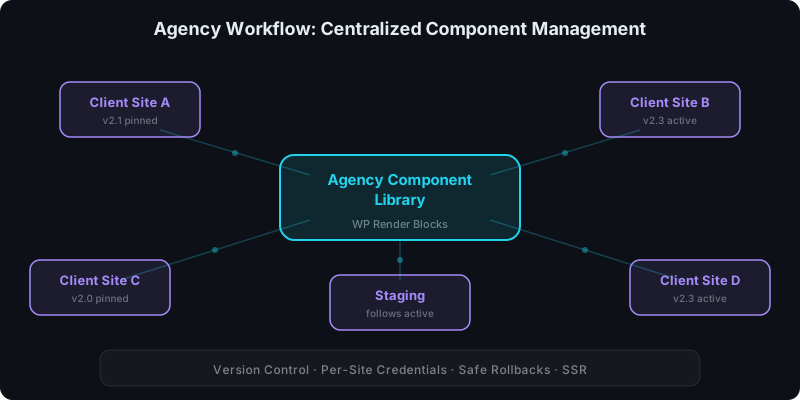
Direct answer: what does the agency workflow look like?
- Build or generate React components (your team, AI tools, or both)
- Upload components once to the WP Render Blocks dashboard
- Connect each client site with its own API key
- Control which version each site runs (active or pinned)
- Roll back instantly if an update causes issues
One component library. Many sites. Independent release controls.
The agency pain points this solves
Consistency across clients
When the same pricing table, feature grid, or hero section runs on 15 client sites, you need a single source of truth. Without it, each site drifts: different CSS tweaks, outdated markup, inconsistent behavior.
WP Render Blocks keeps the component definition centralized. Every site renders the same component from the same build.
Safe updates without client risk
Updating a custom block plugin across 20 sites is risky. One bad deployment affects every client simultaneously.
With version controls, you choose which sites update:
- Staging sites follow active for immediate testing
- Production sites pin to a known-good version until verified
- Rollback by changing the active version if something breaks
See: How Versioning Works for React Components in WordPress.
Component reuse without copy-paste
Agencies reuse UI patterns constantly: CTAs, testimonial sections, comparison tables, FAQ blocks. Without a shared library, reuse means copying files between projects and losing track of which version is where.
Upload once, use everywhere. Each site pulls the component from the central library at render time.
Per-site isolation
Client A should not be affected by changes to Client B. Per-site API keys ensure:
- access can be revoked per client
- credentials can be rotated independently
- usage and renders are tracked per site
See: How to Share React Components Across Multiple WordPress Sites.
A practical agency rollout model
Phase 1: Start with new components
Do not try to migrate everything at once. Use WP Render Blocks for new sections and components while existing custom blocks remain active.
See: How to Migrate from Custom Gutenberg Blocks to WP Render Blocks.
Phase 2: Standardize your component library
Identify the 10-15 components you use most across clients. Upload them to WP Render Blocks. This becomes your agency's shared component library.
Common candidates:
- hero sections
- feature grids
- pricing tables
- testimonial carousels
- FAQ sections with schema markup
- comparison tables
- CTA blocks
- WooCommerce product displays
Phase 3: Connect client sites with governance
For each client site:
- Generate a unique API key
- Install the WP Render Blocks plugin
- Configure the key in plugin settings
- Set the version strategy (active or pinned)
High-value or regulated client sites should pin versions. Internal or actively-managed sites can follow active.
Phase 4: Integrate AI-generated components
Agencies using AI tools like Cursor, Lovable, V0, or Claude can generate client-specific variations quickly and upload them through the same workflow.
The safety checklist applies: review dependencies, verify SSR output, validate before production.
See: Using AI-Generated React Components in WordPress (Safely).
SSR for agency SEO work
Most agency WordPress sites need to rank. That means SSR output for indexable pages.
WP Render Blocks provides SSR on the Indie plan and above. Content appears in page source as real HTML, which means:
- search engines index the content without JavaScript execution
- SEO plugins can analyze the output
- Core Web Vitals benefit from server-rendered HTML
See: Server-Side Rendering (SSR) for WordPress: Why It Matters for SEO.
Manage components across all your sites — see plans and pricing.
FAQ
How many sites can I connect on the Agency plan?
The Agency plan supports a higher number of connected sites and renders. Check the pricing page for current limits. Most agencies start with Pro and upgrade to Agency as their site portfolio grows.
Can different team members manage different client sites?
Yes. API keys are per-site, so you can distribute keys to team members or client contacts. The dashboard provides centralized visibility across all connected sites.
Do I need SSR for every client site?
No. Sites that do not need SEO (dashboards, internal tools, gated content) can use CSR-only rendering on lower-tier plans. Reserve SSR for client sites where search ranking matters.
See: CSR vs SSR in WordPress: When to Use Each.
Summary
WP Render Blocks gives agencies a scalable model for WordPress component operations:
- one centralized component library
- per-site credentials and access control
- version pinning and safe rollbacks
- SSR output for SEO-critical client sites
- AI-generated component support with safety guardrails