
WP Render Blocks Is Live: React Components as SEO-Friendly Gutenberg Blocks
WP Render Blocks is now available. Upload a React component as a ZIP. Get an SSR-rendered, SEO-friendly Gutenberg block in WordPress. No PHP required.
This post covers what shipped, why it exists, and where to go deeper on each feature.
Direct answer
WP Render Blocks bridges React development and WordPress publishing. You upload React components, the platform bundles them and registers them as Gutenberg blocks. Choose SSR for indexable pages or CSR for internal tools. It works with components from AI tools (Lovable, V0, Cursor, Claude) and hand-coded React alike.
The problem we are solving
WordPress developers who want React UI on content pages face three options, none of them great:
- CSR embeds: fast to ship, but the HTML is empty until JavaScript runs. Bad for SEO.
- Custom Gutenberg blocks: native, but you are building and maintaining a WordPress plugin for every component.
- Headless WordPress: full React control, but a complete architecture change.
WP Render Blocks is a fourth option: keep WordPress as WordPress, and ship React components that render as HTML in page source.
For the full comparison, see: How to Use React Components in WordPress with Full SEO Support.
What shipped at launch
SSR for SEO
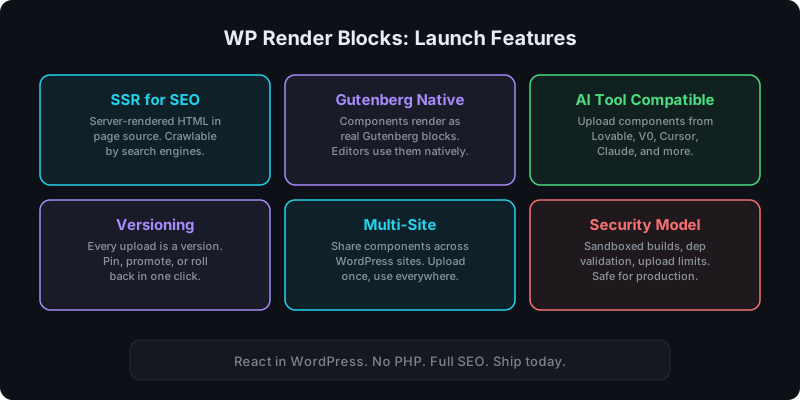
Components can be server-side rendered so the HTML exists in page source. Search engines, SEO plugins (Yoast, RankMath), and social share crawlers see real content, not an empty div.
Deep dive: Server-Side Rendering (SSR) for WordPress: Why It Matters for SEO.
Gutenberg-native blocks
Uploaded components register as real Gutenberg blocks. Editors insert them from the block inserter, configure props in the sidebar, and publish. No shortcodes, no iframes, no workarounds.
Deep dive: How to Render React Components in WordPress Gutenberg.
AI tool compatibility
Components generated by Lovable, V0, Cursor, Claude, and similar tools can be uploaded directly as ZIPs. The build pipeline handles dependencies, bundling, and SSR output.
Deep dive: Using AI-Generated React Components in WordPress (Safely).
Versioning and rollback
Every upload creates a new version. You can pin a specific version to a site, promote a new version, or roll back if something breaks. No more "which version is live on which site?"
Deep dive: How Versioning Works for React Components in WordPress.
Multi-site management
Upload a component once and share it across multiple connected WordPress sites. Update the component centrally and propagate changes on your schedule.
Deep dive: Share React Components Across Multiple WordPress Sites.
Security model
User-uploaded code is treated as untrusted. The platform enforces dependency validation, build isolation, upload limits, and HTML sanitization. This matters especially when AI tools generate the source.
Deep dive: Why Running User-Uploaded React Code Is Dangerous (And How We Secure It).
Pricing
WP Render Blocks has a free tier for getting started. Paid plans:
- Starter ($14/month): CSR-only rendering
- Indie ($29/month): SSR support, more components
- Pro ($99/month): higher limits, priority builds
- Agency ($299/month): multi-site, team features, highest limits
See pricing for full details.
Get started
The quickstart takes about 5 minutes:
- Create an account
- Upload a React component as a ZIP
- Install the WordPress plugin and connect your site
- Add the block in Gutenberg and publish
Full walkthrough: Getting Started with WP Render Blocks.
If you want to try with an AI-generated component, see the guides for Lovable and V0.
What to read next
Depending on what you care about most:
- SSR vs CSR decision: CSR vs SSR in WordPress: When to Use Each
- Performance and caching: Scaling WordPress SSR React Performance
- vs custom blocks: WP Render Blocks vs Custom Gutenberg Blocks
- vs headless: Headless WordPress vs SSR React Components
- Alternatives overview: Alternatives to Custom React WordPress Builds
- WooCommerce integration: How to Use WP Render Blocks with WooCommerce
FAQ
What is WP Render Blocks?
A SaaS platform that takes React components (uploaded as ZIP files), bundles them automatically, and renders them as SSR-capable Gutenberg blocks in WordPress. No PHP knowledge required.
How much does WP Render Blocks cost?
There is a free tier for getting started. Paid plans start at $14/month (Starter, CSR-only), with Indie ($29/mo), Pro ($99/mo), and Agency ($299/mo) tiers for SSR, more components, and multi-site support.
Does WP Render Blocks work with AI-generated components?
Yes. Components from Lovable, V0, Cursor, Claude, and other AI tools can be uploaded directly. The platform handles the build, SSR rendering, and Gutenberg registration.
Summary
WP Render Blocks is live. Upload React, get SEO-friendly Gutenberg blocks. SSR for indexable pages, Gutenberg-native editing, AI tool compatibility, versioning, multi-site support, and a security model designed for production use. Start with the getting started guide or go straight to wprenderblocks.com.